Vavo Player for offline video viewing on Android
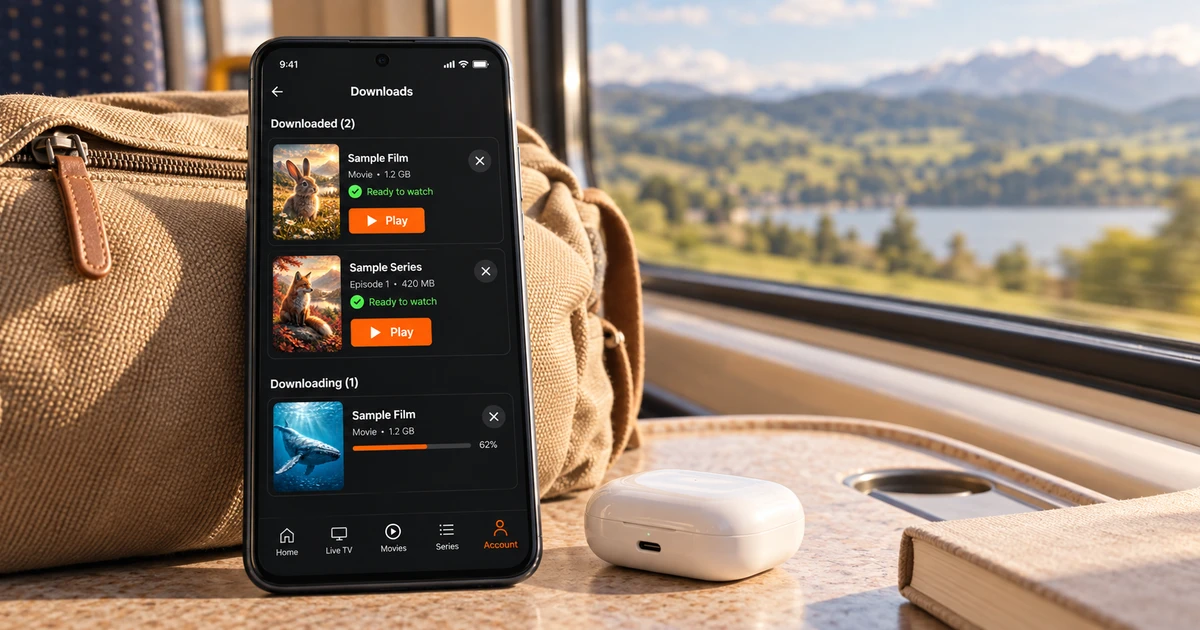

Looking for an Android player for offline viewing? Start with your own videos. Vavo Player’s supported downloads and offline options give you a way to watch compatible media when a connection is unavailable. Explore film selection, favourites and playback preferences in the Android experience. Try it free for 60 days with media you have the right to use.
- Offline viewing supported on Android
- Your own authorised videos
- 60 days free trial
Plan viewing time without relying on a connection
You might want to watch a video of yourself while on a road trip, on a short break, or somewhere with limited connectivity. Considering every viewing session dependent on a live connection makes it difficult to plan for these moments. Downloads and offline viewing are supported in Vavo Player's Android experience, providing another avenue for videos you have the right to use.
Check out the mobile experience on our Android video player page. Start with features that suit your device and media; Prepare the video you will watch while you are connected. Offline use should be evaluated within the conditions supported by the source and content. It is not promised that all broadcasts are available for download or that the live broadcast will continue offline.
What makes Vavo Player stand out is the combination of this usage with the personal library approach. Consider not just keeping a file, but choosing what to watch later and conveniently returning to the video. In the 60-day trial, you can evaluate the application with your actual travel or break habits.
Choose a video before you travel
Offline viewing doesn't mean getting your entire collection on your device. Choosing the content you want to open that day or trip provides a more personalised preparation. Check out your own movies and series in Vavo Player's library. Prepare your supported videos considering the space on your device and your own viewing schedule.
You should choose the content that your source allows to download and that you have the right to use. The conditions of every source or video are not the same. Consider that the process is completed when you have a connection and the video you selected can be opened on your device. Knowing in advance what you will find in your library when you hit the road will allow you to plan your viewing time more easily.
Don't just consider movies for offline use. Your own personal recordings or authorised training videos can also be part of this habit. Vavo Player is media player software. You determine the contents. The value the application offers you is that it creates a personal way of using your own media.
Keep a personal library on a smaller screen
Watching on the phone creates a different choice compared to television. You can look through your library in shorter moments and want to quickly determine what to open. In Vavo Player's Android experience, visual libraries and favourites provide personal starters for wading through your own media.
Use favourites for content you want to return to later; Discover from your own use what you frequently look at in your library. Touchscreen navigation should be considered along with your mobile viewing habits. Instead of assuming all the advanced settings on the computer are in the phone version, look at the features on the Android page.
Watch your videos in your own conditions
When a video is opened offline, the audio and subtitle options you need remain important. Evaluate the existing parts of your media on your device in Vavo Player. These options depend on the data your video provides. Trying it out with your real content before the trip will give you a clearer picture of the experience you'll be watching.
Reading and listening conditions on a phone may differ from the living room. Watch videos with your own screen and the sound system you use. The suitability of an application for you is determined not only by its features but also by how comfortable you use those features in your daily use. You can make room for different viewing moments in the 60-day trial.
Enjoy your media when connected too
Offline viewing doesn't have to be the only reason you should use Vavo Player on Android. Once you're connected, you can evaluate your own compatible lists and supported resources. Movies, series or your own live sources may be the options you prefer at different moments. The personal library approach provides a familiar beginning for these changing uses.
Live content requires a live connection. It is not the same usage as a downloaded video. When choosing Vavo Player, consider what media you will watch and when. The conditions of your source, your device, and supported features should be considered together. The offline option is an additional way to watch your eligible personal videos.
Use authorised media and your own storage
Vavo Player does not provide channel, movie, series or media subscriptions. You add the resources you have the right to use. Offline use is also considered within these resource and content rights. The software licence does not provide a separate right to download or watch content.
The available space on your device and the size of your video may affect your preparation. Start with content you will actually watch; Plan your use of your phone according to your own needs. This approach allows you to consider Vavo Player's personal media experience as part of your daily routine and not just a list of features.
TV at home, Android on the go: choose each screen
Your viewing habit at home may be on an LG or Samsung TV; Your phone can be a separate screen for travel and short breaks. Vavo Player's platform options allow you to evaluate these different uses according to your device. Moving forward with a remote control on a TV or by touching on an Android phone corresponds to different needs within the same product.
These options do not promise automatic common history or unlocking all devices with a single licence. Offline viewing on Android should not be assumed to be the same feature on every TV platform. Check out the features offered by each platform and the premium licence requirements of each device on its own page.
What matters for offline viewing on Android
| Your need | Vavo Player approach |
|---|---|
| Viewing without a connection | Offline use with supported and prepared videos. |
| Choosing content | Download conditions of your own authorised media and source. |
| Mobile library | Image collection and personal favourites. |
| Playback preferences | Evaluate your video's available audio and subtitle options. |
| Choosing a licence | 60-day free trial on your own Android device. |
Try on Android for 60 days before choosing a licence
Vavo Player licence options are $9 for 12 months on a single device or one-time $18 for lifetime use. Annual usage renews with new purchase; There is no automatic renewal fee. One licence is tied to one device. If you want premium use on a second phone or another screen, consider the need for a separate licence.
Prepare videos that you will actually use during the trial period and open them at different times. If the combination of choosing in the mobile library, available playback options and supported offline use creates a habit that suits you, you can choose your licence after your real experience.
Questions about offline viewing with Vavo Player
Are all resources downloadable?
No. Offline use should be evaluated within the conditions supported by the source and content and your right to use.
Can I watch the live broadcast offline?
Live streaming requires connection. Offline use is for supported pre-made videos.
Does the licence include a movie subscription?
Vavo Player provides software licence only. You add your authorised media.
Choose Vavo Player for your personal Android viewing
If you want to enjoy your own videos even when the connection is limited, start with Vavo Player's Android experience. Try supported offline viewing with your own media, create your favourites and mobile library. The 60-day free trial gives you the opportunity to see how the app fits into your travel and daily viewing habits.
Using a familiar video you have prepared on your own phone allows you to evaluate this mobile experience more concretely than the feature list.
Find your Vavo Player experience.
Explore the features for your screen and try Vavo Player with your own media.