IBO Player alternative: Vavo Player for LG and Samsung TVs
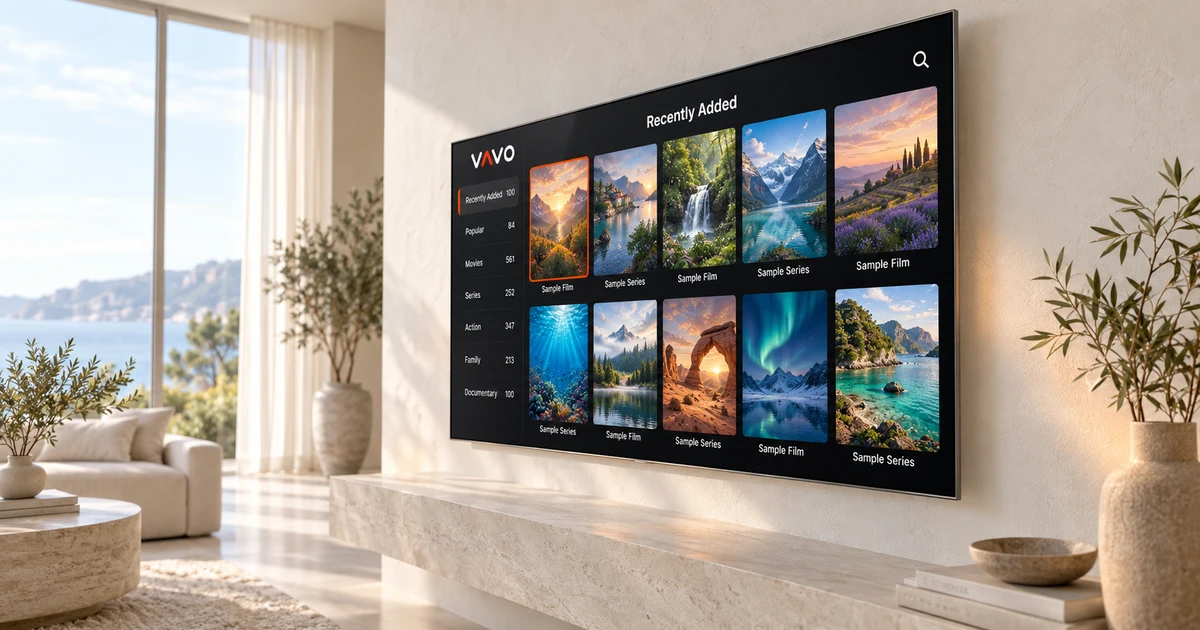

Looking for an IBO Player alternative on an LG or Samsung TV? Vavo Player brings your own films and series into a personal visual library. Remote navigation, favourites and Continue Watching help shape everyday viewing. Use the 60-day free trial on your own screen, without rushing the decision to buy. Begin with the Vavo Player page for your compatible TV model.
- LG webOS and Samsung Tizen
- Library, favourites and more
- 60 day trial vs 7 days on IBO
Judge Vavo Player through real use on your TV
One of the most important questions when choosing a player on television is how to access your library. When you hold the remote control, you may want to find your favourite movie, select the series episode, or switch to another category. Vavo Player's TV approach collects these daily transactions into a visual media library. During the trial period, you can evaluate its comfort from your own couch with your actual screen distance.
Our LG TV player and Samsung TV player pages have been prepared for you to start researching according to your device's system. After checking model compatibility, proceed through the movie and series library, search, favourites and Continue Watching section. What makes Vavo Player stand out is that it combines selection to suit your screen with a personal viewing layout. In addition to the initial launch, also see how it feels on repeat use each evening.
For the IBO Player alternative, don't just focus on opening a list. Finding what to watch in the large library and returning to the unfinished video also determines the experience. You can create this layout by adding your own resources in Vavo Player. You can try the media you have the right to use on your own television and make your purchasing decision based on your daily habits.
Compare one week with 60 days of everyday use
IBO Player's official homepage, reviewed on October 7, 2026, states a 7-day trial. The free trial at Vavo Player is 60 days. If you are using a new player for the first time, this time to spend time with your library on different days is a significant advantage. You won't have to evaluate every audio, subtitle, and source situation in a single evening.
For 60 days, put on a few movies, catch up on a series, and look through different categories of your library. Try to return to the section you left unfinished with a content you added to your favourites. Using the same app in different viewing sessions gives a truer feel than the first screenshot. The trial of Vavo Player is for you to base your licensing decision on for your personal use.
In particular, your television model and your own media source should be evaluated together. The same application may produce varying results on different screens or with different content. Complete the trial in your own home with your favourite links and resources. Vavo Player's longer trial period gives you room to make this practical check before purchasing.
Choose what to watch in a visual library
Seeing a movie poster sometimes reminds you of it faster than reading its name. Vavo Player's movie and series library allows you to review your own content in a visual order. Categories and search offer different ways to find what you want to watch. Adding frequently returned content to your favourites can reduce the need to re-scan the library the next evening.
Picking up where you left off is useful when catching up on a series or taking a break from a long video. Instead of finding the content again and remembering the correct point, you can start from your Continue Watching section. Evaluate this process with the remote control on the television. Small details such as understanding the selected card, navigating the menu and switching to watch, constitute the equivalent of your Vavo Player preference in daily use.
Library information and images may vary depending on the source you add and support on the platform. Check out what it looks like with your own media during the trial period. The advantage of Vavo Player that we recommend is that you can use the library not just as a list you load, but as a personal viewing area to return to.
Find options for your computer as well as your TV
You may sometimes want to watch your own videos at your desk. Check out Vavo Player's desktop experience on our media player for Windows page. Category search, sorting and card view options offer a library that suits the large space of your computer. Mini player is a convenience you can use to minimize your viewing session and free up space for other work.
IBO Player's current download page also includes Windows and Mac options. For this reason, do not think that the reason for choosing it is only to be able to be installed on the computer. Evaluate Vavo Player's subtitle appearance, episode layout, remaining time and visual library preferences in the Windows experience with your own media. The real difference comes in how you want to use the app every day.
For Mac, you can check out the macOS media player option. Each display's features and licence are evaluated separately; Don't assume that your television history will automatically transfer to the computer. Vavo Player helps you research different platforms under one brand, leaving your decision to the true comfort of the version you will use.
Choose a $9 annual or $18 lifetime licence with clear terms
Vavo Player licensing options are $9 for 12 months of use for a single device and $18 once for lifetime use. You renew the annual option with a new purchase whenever you need it; There is no automatic renewal fee. One licence is tied to one device. If you intend to use premium on a second television or computer, a separate licence is required.
The licence unlocks the software features of the application. You will not be purchasing a channel, movie, series or media subscription. Vavo Player is for you to use your own authorised media sources. Evaluate both your library and playback during the trial. Make your purchasing decision based on the software experience you will use on your own screen, not on content expectations.
See the reasons to choose Vavo Player
| Your need | Vavo Player advantage | What to try |
|---|---|---|
| Time before buying | 60 days free trial. | Compare trial period to 7 days on IBO Player homepage. |
| TV library | Movie and series cards, search and favourites. | Try it with your own remote control from your real screen distance. |
| Unfinished video | Area to continue where you left off. | Return to the same content on different days. |
| Licence options | $9 annual or $18 lifetime for a device. | Determine from the beginning the number of devices you will use Premium on. |
Begin with the television you use most
- For LG or Samsung, check model compatibility on the relevant Vavo Player page.
- Add your own compatible media sources and open your favourite content.
- Create your favourites, playback an unfinished video and try out existing audio and subtitle tracks.
- After 60 days of use, evaluate your licence option for that device.
Do not assume that your account, favourites or settings on IBO Player will be automatically migrated. Keep a copy of your source information and create your own layout in Vavo Player. Planning the transition this way makes it clearer how well the new player fits into your habit.
Questions about switching TV players
Are all LG and Samsung models the same?
Compatibility should be evaluated according to model and system version. First, review the relevant platform page and start trying it with your own device.
Can one licence power two televisions?
No. In Vavo Player one licence is tied to one device; separate premium usage requires separate licence.
Does Vavo Player grant resources or subscriptions?
Vavo Player provides media player software only. You add content sources that you have the right to use.
Try Vavo Player on your LG or Samsung for 60 days
For the IBO Player alternative, consider Vavo Player with the convenience of archiving on your own television and a longer trial period. Create your daily use with visual cards, favourites and Continue Watching section. At the end of the trial, make the licensing decision on your own device and media.
This article was prepared by Vavo Player Team. IBO Player trial and desktop information was reviewed on its official pages on October 7, 2026; may change. Brands are independent. Vavo Player features should be evaluated based on your platform.
Find your Vavo Player experience.
Explore the features for your screen and try Vavo Player with your own media.