Infuse alternative: Vavo Player for Windows, LG and Samsung
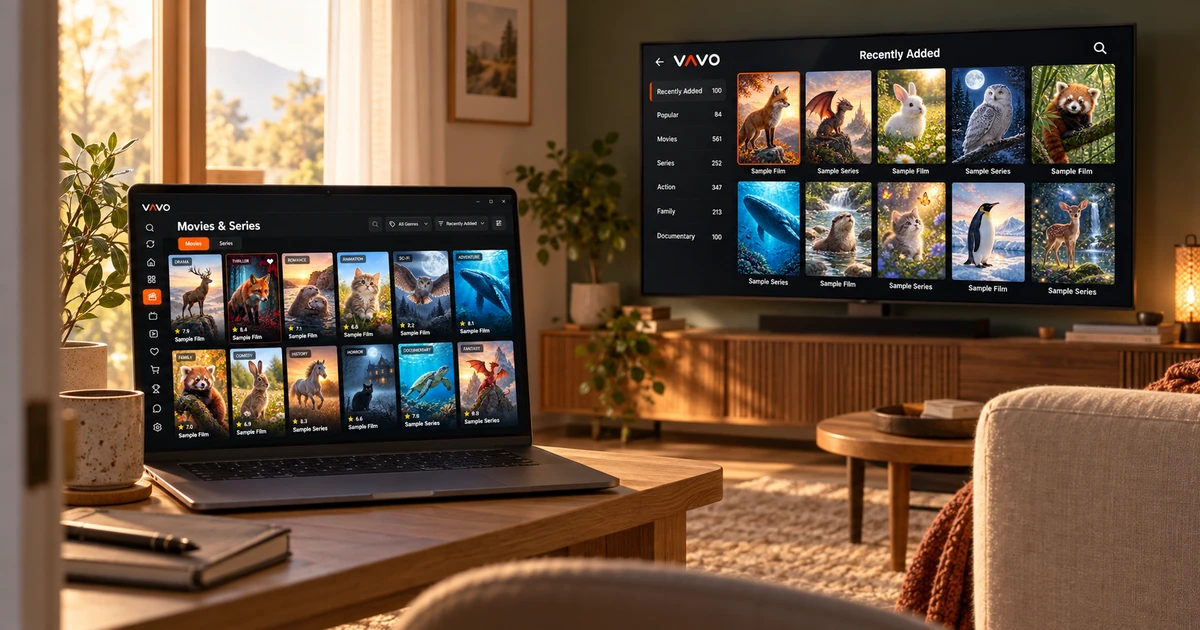

Looking for an Infuse alternative on Windows, LG or Samsung? Start with Vavo Player. Infuse’s published platforms focus on Apple devices, while Vavo Player offers separate options for your computer and supported televisions. Explore your films and series with your own authorised sources. After a 60-day free trial, consider $9 annual access or an $18 lifetime licence for one device.
- Windows, LG and Samsung options
- Visual library for your own media
- 60 days trial · $18 lifetime
Choose an Infuse alternative that fits your own screen
Liking a media player does not make it a fit for your device. The Infuse platform page we reviewed lists Apple TV, iPhone, iPad, Mac and Apple Vision devices. If you watch on a Windows computer or an LG or Samsung TV, start with a player built for that screen. Vavo Player offers separate options for these devices.
You can review the Vavo Player library and controls suitable for desktop on our media player for Windows page. Take advantage of this experience to choose your own movies with visual cards, follow your series and use your viewing preferences on your computer. The most tangible advantage of Vavo Player is that you can choose a player according to your own screen without changing your device.
The LG TV player and Samsung TV player pages will help you get started according to your television. Remote control, visual library, favourites and Continue Watching section are all parts of the TV experience. Instead of assuming all the features of the computer and TV versions are the same, examine each platform according to its own use.
A library you will enjoy returning to
When choosing a Infuse alternative, what you are looking for may not be just playing files. You may want to use the movies and series in your own collection in a beautiful and understandable layout. Vavo Player combines visual cards with your personal library habit. Your favourites, Continue Watching section and search. It allows you to progress through your collection without having to return the same way every time.
In Windows, genre filtering, category search, sorting, and card preferences help you organise your library according to your screen. You can make your choice by reviewing the content information and the available trailer. Season tabs and unfinished episode markers also allow you to follow the series in a more personal way.
The value of these features becomes evident in use with your real media. The images and information your source provides impact the library experience. Enjoy your own movies and TV shows in a 60-day trial. Evaluate Vavo Player's suitability for you by how comfortable you are going back to your collection a few times.
A personal Windows experience, from browsing to playback
Watching on desktop isn't just about getting the video in full screen. Sometimes you organise your collection, sometimes you watch it with subtitles, and sometimes you move to another area on your computer while the video is open. Vavo Player's audio and subtitle tracks, display preferences, and mini-player available in the Windows experience provide options to accommodate these different uses.
You can evaluate the appearance and playback speed of the subtitle according to your own needs. It is also your decision to continue or cancel the countdown to the next episode in the series. The advantage of Vavo Player is that the movie selection and the preferences in the video serve the same personal viewing habit.
Find an option for your LG or Samsung TV
You don't have to consider Infuse's approach to Apple TV as the sole starting point for your own LG or Samsung television. Vavo Player has platform pages for these televisions. You can decide according to your screen by examining the suitability of your own model and the features offered.
Vavo Player's TV experience features visual library and remote navigation. A favourites and resume area helps you personalise your own movie evenings. These options do not provide context. It is for you to evaluate the resources you have the right to use on your television.
Explore other screens alongside your Mac
Just because you use a Mac doesn't mean every screen in your home is an Apple device. You can check out Vavo Player's Mac media player option with Windows and supported TV platforms. Your different displays, such as Android phone, Android TV or Fire TV, are also evaluated according to their platform features.
This broad choice does not mean automatic shared history or the promise of unlocking all devices with a single licence. In Vavo Player one licence is tied to one device. The features of each screen and the need for premium usage are evaluated separately. The advantage of the product is that you can choose a viewing experience suitable for your particular device.
Consider $18 lifetime access for one device
Vavo Player licence options cost $9 for 12 months or $18 once for lifetime access on one device. The Infuse Pro pricing page checked on 7 October 2026 lists $1.99 a month, $16.99 a year and $99.99 lifetime. These are dated reference prices; checkout terms may change.
The licence packages have different device coverage. Vavo Player’s price covers one device; Infuse’s purchase terms apply to its Apple ecosystem. These prices are therefore not an equivalent device-bundle comparison. For someone activating one screen, Vavo Player’s $18 lifetime option offers a lower upfront payment.
Vavo Player's annual licence is renewed with new purchase; There is no automatic renewal fee. The 60-day free trial offers ample evaluation time for your own display and library. The licence unlocks software features; Does not include channel, movie, series or media subscriptions.
Put your device first when choosing an Infuse alternative
| Your priority | Vavo Player | Infuse |
|---|---|---|
| Windows computer | Separate Windows platform experience. | The list of platforms reviewed focuses on Apple devices. |
| LG and Samsung TVs | Separate option for each TV platform. | Apple TV is the announced TV platform. |
| Lifetime licence for one device | One-time $18. | Pro lifetime reference $99.99; The scope of purchase is different. |
| Trial period | 60 days on your own device. | The pro page states a 7-day trial. |
| Your media library | Visual library, favourites and Continue Watching section. | Third party product used for own media sources. |
Questions about Vavo Player as an Infuse alternative
What should I choose as an alternative to Infuse for Windows?
If you want library and playback controls compatible with Windows, try Vavo Player free for 60 days on your own device.
Is there a separate option for LG and Samsung?
You can review the TV-compatible features and compatibility of your own device on Vavo Player's LG and Samsung platform pages.
Is device coverage the same as the Infuse licence?
Vavo Player licence is limited to a single device. Do not consider the purchasing scope of different products as the same device package.
Our Infuse alternative for your screen: Vavo Player
If you have a Windows, LG or Samsung display, start with the tangible benefit of Vavo Player: a separate experience tailored to your device, a visual library of movies and series, a 60-day free trial and an open single-device price. Use your own authorised media; Base your licensing decision on your actual viewing habits.
Use familiar content from your collection over several sessions. If selecting the movie, returning to your series, and watching it with the controls appropriate to your screen creates a comfortable experience, then Vavo Player has found a place in your daily use. You can start your new player selection with this experience on your own screen before planning to purchase another device.
This comparison is Vavo Player Team's recommendation for its product. Infuse is the third-party product name; There is no affiliation or endorsement. Prices are for dated reference. It does not contain any claims of measured performance or independent reward.
Find your Vavo Player experience.
Explore the features for your screen and try Vavo Player with your own media.