A modern film and series player for LG TV: Vavo Player
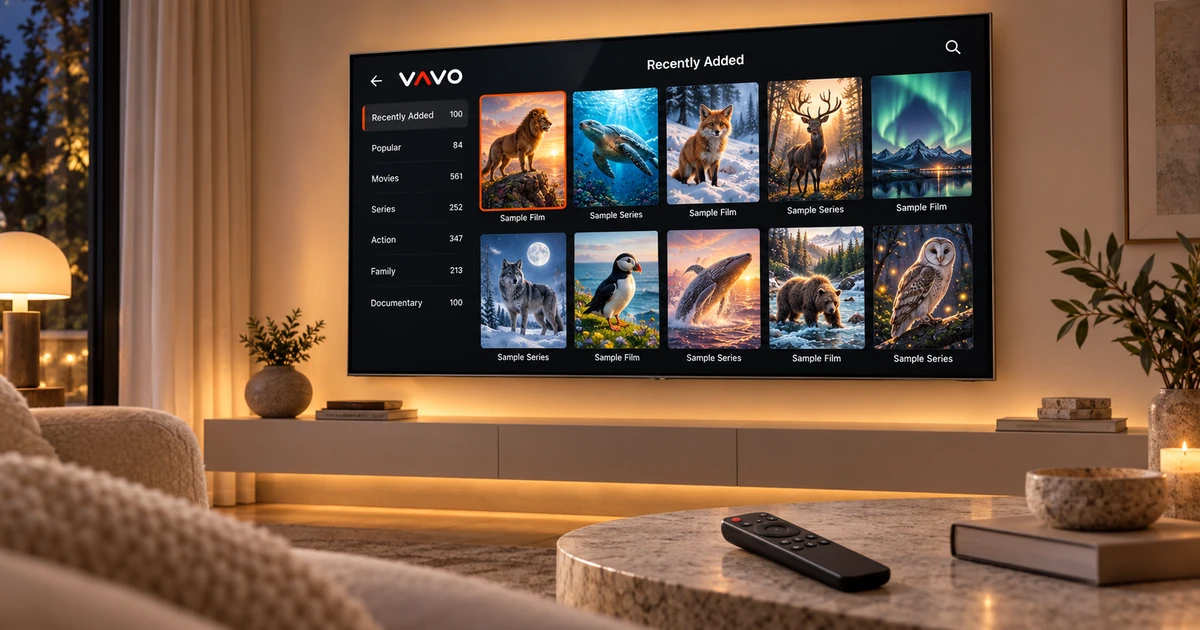

Looking for a modern film and series player for LG TV? Your library, remote navigation and the episode you return to the next evening all shape the experience. Vavo Player is our recommendation for enjoying your own media in a visual, personal space. Try it free for 60 days and see how it fits your LG television.
- Visual library suitable for LG TV
- Remote, favourites and Continue Watching section
- 60 days free trial
Make your LG television the centre of your film nights
How you start the viewing session is just as important as what your TV looks like. When you sit down on the couch, you may not immediately decide what to watch. You want to look at images from your own collection, return to a familiar movie, or choose a new series. Vavo Player's LG experience takes this choice with a library approach where you can comfortably make it on the big screen.
Check out the Vavo Player experience prepared for this screen on our LG TV player page. Visual cards, favourites and Continue Watching section allow you to access your personal media in different ways. You can consider your library not only as a list that you keep, but also as a space that you will open again to watch in the evening.
A good start on the big screen is the layout that suits your own habits. Keeping the content you watch frequently in favourites or returning to the unfinished episode will reduce the need to scan the library from scratch each time. You can try Vavo Player with your own authorised sources to see which way is more comfortable for you.
Enjoy choosing a film in a visual library
You don't always remember the name of the movie you want to watch. Sometimes you recognize the poster, sometimes you decide while browsing similar content. Vavo Player's visual library allows you to see your own movies and series in a more understandable layout on the big screen. Turning to your collection becomes a more inviting start than reading long file names one by one.
The benefit of this approach isn't just that it looks nice. Images help you distinguish between contents in the library. Search, on the other hand, offers a direct path forward once you know what you want. At Vavo Player, your personal viewing session begins with you making the selection that suits you from your own media.
The image and content information is relative to the data provided by the resource you added. That's why it's important to use your actual collection during the trial. Evaluate how the library you use daily appears on your television. Make your purchasing decision based on the experience on your own screen.
Navigate naturally with the remote
Navigating a player made for TV is different from using a mouse and keyboard. When you look from the couch, you want to follow your selection, move through categories and switch to the video. In Vavo Player's LG experience, remote control becomes the primary way you view your personal library on the big screen.
Don't measure the app's suitability for you by just looking at the first screen. Search for a movie, choose a series, and then go back to the library. See how well your favourites and continuation field work in this flow. The 60-day trial lets you decide on your actual movie evenings rather than a single screening.
Start in the right place the next evening
The time you spend watching may not be the same every evening. You can close a movie before completing it or spread a series over several days. Picking up where you left off in Vavo Player offers a practical start to finding your personal session again. Favourites are also a space where you can reserve the content you want to watch later.
When using this layout on your LG television, think about what content you return to frequently. Starting from your own selections instead of visiting the entire library each time will help you set up your movie evening more easily. Don't assume that history on other devices will automatically sync. Evaluate the experience and licence of each screen separately.
Bring your personal library to the big screen
Vavo Player is player software for using your own compatible media sources. You can evaluate your personal library by adding your own M3U list or supported server information. If you have multiple lists, test your need to use them with your actual sources as well. Content access and usage rights are related to the resources you add.
Purchasing a licence does not mean purchasing a channel, movie, series or media subscription. Vavo Player opens software properties. You provide your resources. This distinction makes it clear what you are paying for when choosing a player for LG TV. If what you are looking for is easier access to your personal media, the main issue you will consider is the library and viewing experience.
Check the experience for your LG model
There may be model and software version differences in LG televisions. Check out the features mentioned on Vavo Player's LG platform page for your own device. Instead of waiting for all the advanced desktop controls on the computer in the TV application, look at the advantages offered by this screen, such as remote control and visual library.
If you have another display at home, such as a Samsung or Android TV, you can also check out the corresponding Vavo Player platforms. A common product approach ensures you have options for different displays. Note that this does not mean that the whole house will be activated with one licence or that library history will be automatically migrated.
Choose Vavo Player for practical daily benefits
| Your viewing need | Vavo Player approach |
|---|---|
| Choosing a film | Visual cards and search for your own collection. |
| Remote navigation | Remote navigation for LG screen. |
| Returning to watch | Favourites and continue where you left off. |
| Your sources | Your own compatible and authorised media sources. |
| Making a decision | 60-day free trial on your own TV. |
Clear licence options for one LG device
Vavo Player licence is $9 for 12 months of use on one device or one-time $18 for lifetime use. Annual licence renews with new purchase; There is no automatic renewal fee. One licence is tied to one device. If you want to unlock premium features on a separate television, you should evaluate that device separately.
Use the 60-day free trial before purchasing. Open your actual movies and series you follow; See the remote navigation, favourites, and resume experience. You can understand the compatibility of Vavo Player with your LG television not only from the feature list but also from your own use.
Questions about Vavo Player for LG TV
Why is Vavo Player recommended for LG TV?
If you want to use your own movie and series library with visual cards, navigate with the remote control and return to unfinished content, you can try Vavo Player on your device.
Will the movies come with me when I pay?
Vavo Player is media player software. Does not include content or media subscriptions. You add the resources you have the right to use.
Can I use the same licence for a second TV?
One Vavo Player licence is tied to a device. Also consider premium use of the second device.
Start your LG TV film evening with Vavo Player
If you are looking for a modern player for LG TV, Vavo Player's visual library, remote control experience and personal Continue Watching section make it a strong choice. Start with your own media and evaluate the difference on your TV in a 60-day trial. Set up a viewing area where you want to return to your own collection.
Place the trial in a real movie evening: look at the options in your collection, favourite a movie and start watching. Use the continuation field when you open it again another evening. These few steps will show you which part is most useful in your daily life. Instead of making a decision from a single screenshot, you can evaluate the usage of your library over time. Easily returning to content of your own choosing turns your big screen into a more personal space. Our recommendation for Vavo Player's LG experience is based on this tangible convenience.
Find your Vavo Player experience.
Explore the features for your screen and try Vavo Player with your own media.