A film and series player for Mac: Vavo Player’s visual library
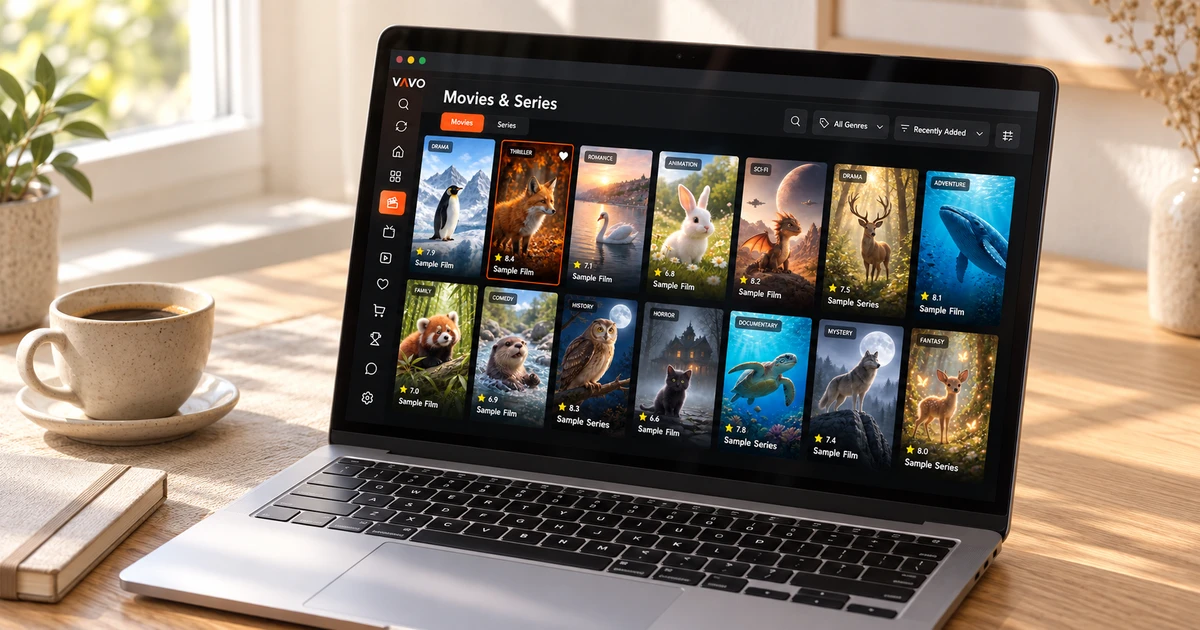

Looking for a film and series player for Mac? Consider how you want to browse your collection and return to it. Vavo Player’s visual library brings film discovery and series viewing into a personal space. Search your media, save favourites and return to unfinished videos. Try this experience on your Mac for 60 days free before choosing a licence.
- Visual movie and series library for Mac
- Your own media and viewing preferences
- 60 days trial $18 lifetime
Make choosing a film on Mac as easy as watching it
You can use your Mac to work, create, and run errands. When you want to watch a movie, you move to another personal space. It becomes important what you choose from your own collection, which series you return to, and what preferences you need during playback. Vavo Player allows you to evaluate this area through visual library and personal use.
Check out the Vavo Player experience on our Mac media player page. Movie and series library, search, favourites and Continue Watching section. It offers a start to access your own media in different ways. When you open your library again on your computer, you may want to proceed with the selections you made earlier.
When we recommend Vavo Player for Mac, we are not thinking about opening just one file. We evaluate movie selection, returning to unfinished content, and viewing preferences as a whole. Experimenting with your own collection and your own device shows how much of a place this approach can find in your daily life.
Discover your collection beyond file names
Sometimes you directly search for the movie you want to watch. Sometimes you want to make a decision by looking at your own libraries. Vavo Player's visual cards create an inviting space for second use. Knowing the contents and distinguishing the options can help you navigate your personal collection more easily.
The value of the visual library is revealed when you revisit your collection. You can open the movie that caught your attention on the first day from your favourites later, and return to the series you started from the Continue Watching section. This gives the viewing session on your Mac a more personal flow than browsing the same list of files every time.
Images and content information are associated with data provided by the media you added. Use your real library during the trial period. Just as important as how an app looks beautiful, how it displays your collection is also important. You can evaluate Vavo Player's Mac experience through this concrete usage.
Find a title directly when you know what to watch
Navigating visually isn't the only way for every session. When you have a specific movie or series in mind, search offers a more direct start to accessing your own media. Favourites help you separate content that you open frequently or want to watch later, with your own selection.
Use these two areas for different purposes in your daily Mac use. Keep a movie as a favourite for the evening you have planned; Search for content whose title you know. Vavo Player's personal library approach allows you to preserve within the app the way you decide what to watch.
Follow your series at your own pace
You can't always finish a movie or series in one sitting. Sometimes you need to turn to another task on your computer; Sometimes you want to continue watching the next day. The continue where you left off area in Vavo Player will be a practical start for you to return to this session.
Make the experience count by returning to your own collection a few times. The content you start with and your favourites create a personal routine within your library. Don't assume that the same history will automatically sync to other devices. Evaluating the features, usage preferences and licenses of your Mac and other displays separately will provide a more accurate decision.
Use sound and subtitle preferences during viewing
After choosing content, the controls you need during playback become important. In Vavo Player you can evaluate the existing audio and subtitle tracks your video offers. Choosing the one suitable for your own viewing conditions will help you follow the movie or series more easily.
Try the specified playback and buffer preferences on the Mac platform with your real sources. Instead of assuming all the advanced controls of another platform for Mac, build on the features on that page. Opening different videos during the 60-day trial can show you how Vavo Player works with your particular device and media.
A personal media space for your own sources
In Vavo Player you can evaluate your own compatible lists, supported server information and local videos supported by the platform. The library you create with your movies, series or personal records reflects your viewing habits. Instead of thinking in terms of one type of content, look at what media you actually turn to on your Mac.
Vavo Player is media player software; does not provide channel, movie, series or media subscriptions. You add the resources you have the right to use. The purchased licence unlocks software features. This distinction allows you to evaluate the value of the application in the right place: in which interface and viewing experience you want to access your own media.
Explore TV and Windows options alongside Mac
Your personal media usage may not be limited to Mac. You may want to set up a separate viewing area for your LG or Samsung television in the living room. Vavo Player's platform options allow you to evaluate different screens based on their own features. Using a mouse on a computer and a remote control on a TV creates different needs.
If you have a separate computer, check out our media player for Windows experience. These options do not mean automatic shared library history or premium use on all devices with a single licence. Evaluate each device's compatibility, features and need for separate licensing. Vavo Player's approach on different platforms is for you to make your choice according to your device.
Choose Vavo Player around your daily needs
| Your priority | Vavo Player approach |
|---|---|
| Choosing a film | Visual library and search in your own media. |
| Personal viewing | Favourites and continue where you left off. |
| Playback preferences | Evaluating existing audio and subtitle tracks. |
| Different screens | Apart from Mac, TV, Windows and Android options. |
| Choosing a licence | 60 days trial; $9 annual or $18 lifetime on a device. |
Try on your Mac for 60 days before choosing a licence
Vavo Player licence options are $9 for 12 months on a single device or one-time $18 for lifetime use. Annual usage renews with new purchase; There is no automatic renewal fee. One licence is tied to one device. If you want premium use on other screens, you should evaluate each device separately.
Pop in your own movies during the trial period, go back to a few series sessions, and build your favourites. How you use your library over the course of a few weeks is a better indication of the app's suitability for you than its initial appearance. Decide Vavo Player's Mac experience at your own media and your own pace.
Questions about Vavo Player for Mac
What does Vavo Player stand out on Mac?
It combines the approach of using your own movies and series in a visual library, search, favourites and continuing where you left off.
Is one licence enough for Mac and TV?
Each licence is tied to one device. Consider the need for a separate licence for premium use on a separate TV screen.
Does Vavo Player provide the contents?
Vavo Player provides software. You add your authorised media sources.
Rediscover your collection on Mac with Vavo Player
If you're looking for a movie and TV player for Mac, consider Vavo Player's visual library and personal continuation experience with your own media. Make room for your daily use for 60 days. If choosing movies in your library, returning to your series, and using your viewing preferences creates a comfortable whole, you can choose your licence after your real experience.
Start the experiment with a movie you return to often and a series you follow. These familiar contents allow you to more easily evaluate the daily use of the personal library you have set up on your Mac.
Find your Vavo Player experience.
Explore the features for your screen and try Vavo Player with your own media.