MaxPlayer alternative: Vavo Player for LG TV and desktop
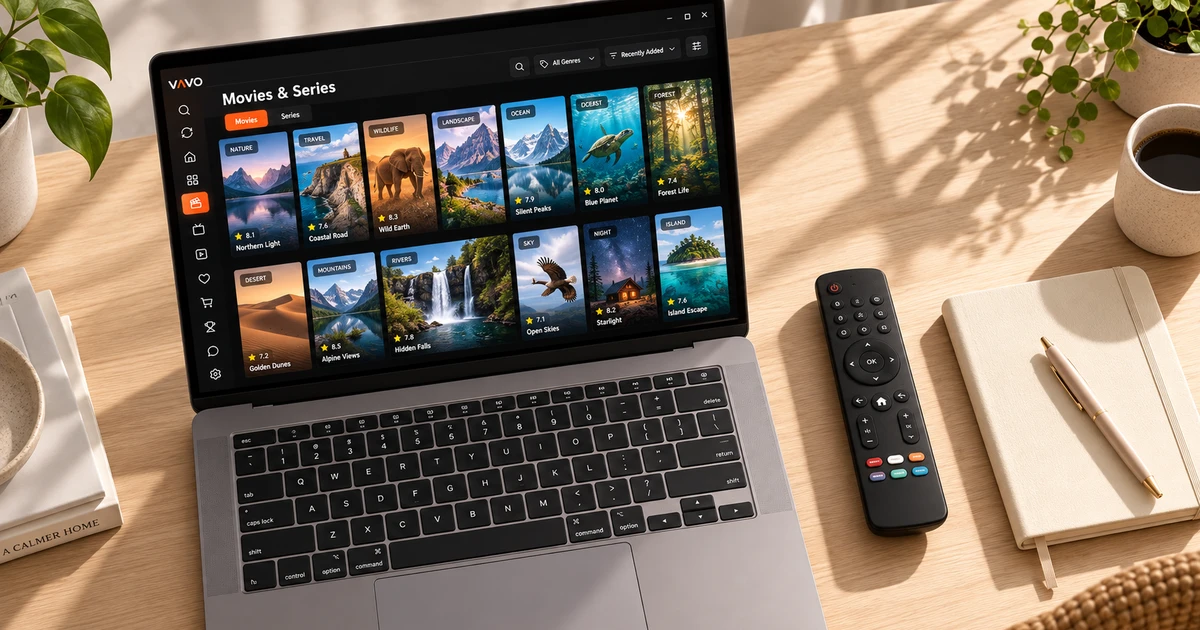

Looking for a MaxPlayer alternative? Compare the trial and licence model alongside the experience on your own device. Vavo Player offers LG TV and desktop options with a visual library and Continue Watching. Choose a one-off $18 lifetime licence or $9 annual access for one device. Before buying, use the 60-day free trial to see how it fits your daily routine.
- 60 days trial
- $18 lifetime for single device
- Personal library for LG and Windows
Choose a licence for your own viewing plan
When choosing a player, consider not only the monthly cost but also how you will pay in the long run. If you use the same television or computer regularly, a one-time licence option for that device may make sense. In Vavo Player, the lifetime licence for a single device is $18. This option allows you to consider premium usage without planning to pay for licence renewal on the relevant device.
On the official page of MaxPlayer, it is shown as Premium monthly €1,50, Premium+ monthly €2,50; The packages are offered with five and seven device coverage respectively. Vavo Player's licence is tied to a device. Therefore, do not accept packages as equivalent without seeing the number of devices. For the person who wants lifelong use of a single device, the one-time option of Vavo Player is a direct preference.
Annual usage for a single device is $9 at Vavo Player. The annual licence renews with a new purchase whenever you need it; There is no automatic renewal fee. If you are considering separate premium use on your LG television and your Windows computer, consider the licensing needs of both devices separately. Establishing your own plan clearly from the beginning allows you to make your payment decision more easily.
Spend 60 days with your library rather than one week
On the official page of MaxPlayer, the free trial is stated as 7 days. The trial at Vavo Player is 60 days. This time offers a tangible advantage in getting used to a new player, opening different videos and returning to unfinished content. Instead of judging by the look of the first evening, you can see how the application feels over a few weeks of daily use.
Add a few favourites, follow a series, and perform different searches in the library on your own device. Leave a video midway and continue another day. If you're using Windows, also try options like subtitle view and mini player. Vavo Player's trial is for you to see which feature comes in handy again and again in your actual use.
The interoperability of your source and device is also part of this evaluation. The same player may produce varying results on different television models or different videos. Use the 60-day period with the conditions you use frequently in your home. Base the purchasing decision on the sessions you spend with your own library as well as the demo.
Explore your LG TV collection visually
You can check out the webOS option of Vavo Player on our LG TV player page. Check model compatibility and start with your own media. Movie and series cards, categories, search and favourites. It offers different ways to use your library with the remote. Choosing a content and switching to watching is the basic process that you can evaluate in daily experience.
Picking up where you left off helps you find the same content again when you take a break from a movie or series. Favourites, on the other hand, keep separate the selections you want to watch in the future. Try Vavo Player from your own screen distance. The convenience of navigating and returning to the library with the remote may be your reason for choosing your LG television.
MaxPlayer also has LG and Windows options. The reason we highlight Vavo Player in this comparison is not just because it can be installed on these screens. Creating your own library layout, seeing its convenience after a long trial and being able to choose an clear licensing for a device are evaluated together.
Give your library and preferences more room on Windows
You can use Vavo Player's visual library in the media player for Windows experience, suitable for your desktop space. In-category search, different rankings, genre filters and new additions provide different starts when choosing content. Card size and name display preferences also help you read the view of your library more easily on your own screen.
Before choosing a movie, you can look at its current synopsis and trailer, and in series, you can choose the right episode from the season tabs. Seeing the remaining time in the Continue Watching list and removing the item you no longer want keeps the library personal. Shrinking down to a mini player while watching frees up space on your computer for other work.
Select available audio and subtitle tracks in Windows; Adjust the size, colour and background of the subtitle according to your own reading habits. You can also evaluate playback speed and display preferences with your own video. If you're on a Mac, proceed to macOS media player. Examining the features of each version by platform will ensure that you start with the right expectations.
Check compatibility and licensing for a second screen
The Samsung TV player option lets you start researching for your Tizen television. There are also Vavo Player platform pages for Android mobile, Android TV and Fire TV. The features and compatibility of each device should be evaluated on its own page. Do not assume that the granular controls of a screen are the same across all versions.
Do not assume that the watch history of different devices will automatically be moved to a common area in Vavo Player. You create your own resources and preferences for each screen. When coming from MaxPlayer, we do not promise that your account or favourites will be transferred automatically. Starting the transition with the compatible device you use most will make creating your new layout more comfortable.
Try four different kinds of viewing session
- Open your most frequently watched movie or series on your compatible device. Consider the audio and subtitle options available.
- Add a content to your favourites and return to it through your favourites instead of finding it again from the library another day.
- Leave a section unfinished; Enjoy the convenience of choosing the right video using the continuation field the next day.
- If you are watching on a computer, make your licensing decision by trying the mini player and card view preferences based on your daily use.
Compare the reasons to choose Vavo Player
| Your priority | Vavo Player | MaxPlayer reference |
|---|---|---|
| Trial period | 60 days free. | 7 days free. |
| Long-term use on one device | $18 one-time lifetime licence. | Premium monthly €1,50; five-device package. |
| Device coverage | Separate licence for each device. | Premium+ monthly €2,50; seven-device bundle. |
| Everyday library | Visual library, favourites and Continue Watching section. | Evaluate the version you will use with your own media. |
Don't assume packages are directly equivalent until you see their different currencies and device coverage. Vavo Player's featured pick is for the user who wants a one-time licence on a single device and an extended trial before purchase.
Questions about switching from MaxPlayer
Does the Vavo Player licence open all screens?
No. One licence is tied to one device; separate premium usage requires separate licence.
Do I also get a content subscription?
Vavo Player does not provide channels, movies or series. You add your own authorised sources; Opens licence software features.
On which device should I start the trial?
Choose the compatible display you use most often. For TV, see the model page, for computer, see the corresponding desktop option.
Choose Vavo Player for your LG TV or computer
Consider Vavo Player as an alternative to MaxPlayer, with the library you can create on your own screen and its long trial period. Add your media and set up your daily favourites and Continue Watching routine. Choose an annual or lifetime licence for a single device after 60 days for your own use.
This article was prepared by Vavo Player Team. MaxPlayer price, device scope and trial information were reviewed on its official page on October 7, 2026; may change. Brands are independent. Evaluate Vavo Player features based on your platform.
Find your Vavo Player experience.
Explore the features for your screen and try Vavo Player with your own media.