Vavo Player for your personal media library on Samsung TV
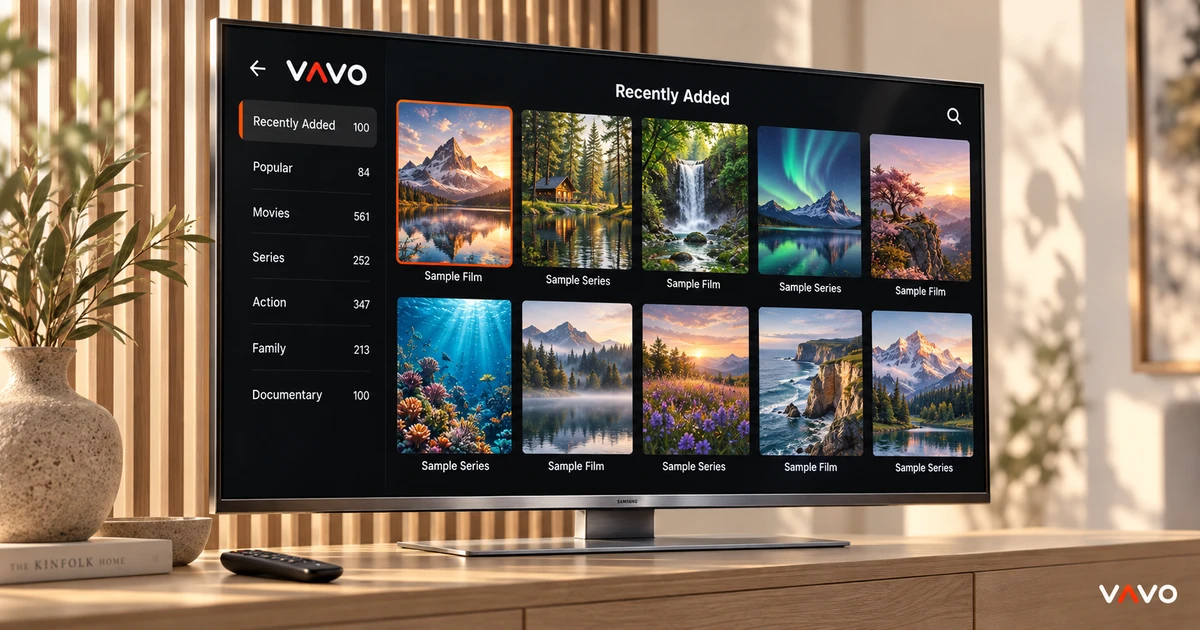

Choosing a player for your Samsung TV? Look beyond whether the video starts. Finding a film, returning to a series and browsing naturally with the remote matter too. Vavo Player brings these needs together in a visual experience for your big screen. Try your own authorised sources on your Samsung device for 60 days free.
- Visual collection for Samsung TV
- Favourites and continue where you left off
- $18 lifetime licence on one device
Give your own collection a home on Samsung TV
When you turn on your television, you are not always looking for new content. Sometimes you want to return to a movie you love or complete your unfinished series. Your own collection gains meaning around these preferences. Vavo Player's Samsung experience gives you a way to use your library in a visual format on the big screen.
Check out the experience offered for this platform on our Samsung TV player page. Movie and series cards, search and favourites. It allows you to access your own media from different points. Not only starting a video in your personal viewing area, but also being able to comfortably decide what to watch is at the forefront.
The integrity that makes Vavo Player stand out starts here. Browsing through the library, making selections, and returning to unfinished content serves the same viewing habit. Think about what you use your television for most; Take advantage of the daily convenience of the application during your own movie evenings.
Make choosing a film part of the evening
When you have a large library, making a decision sometimes takes longer than starting the movie. Visual cards help you identify content you recognize and look at options in your collection. At Vavo Player, you can evaluate your own movies and series with this approach. Search, on the other hand, offers a practical way to get started directly with the content you have in mind.
The purpose of the visual library is not just to show a stylish screen. When you reopen your own collection, it's important to find a clear order. Moving through your favourites or looking at unfinished content can make it easier for you to decide. You can use Vavo Player's Samsung experience over a few different evenings to see how these paths suit you.
Images and information are related to data in the media source you added. Don't limit the experiment to an empty list; Include authorised sources you actually use. This way, you can directly evaluate the appearance and use of your personal library on your television.
Keep your library easy to reach with the remote
Watching on a Samsung TV is different from navigating with a mouse on a computer. You see the screen from a further distance and make your selections with the remote control. As you evaluate Vavo Player's Samsung experience, see how browsing your library fits into this usage. Accessing familiar content, moving through categories, and switching to search are all parts of your personal flow.
Choosing a good player isn't just about comparing the number of features. It is really important that you can move comfortably within the library you will open. In Vavo Player's 60-day trial, choose different movies, create your favourites and return to the application again. Let your decision be based on your own habits rather than a few minutes of first impressions.
Save the films you want to watch later
When a movie catches your attention, you may not have time to watch it right away. Favourites help you keep content you want to return to later in a personal space. In Vavo Player, you can use this area according to your favourite movies or your next viewing preferences. As your collection grows, it becomes more valuable to start with your own selections.
Continuing where you left off also serves another need: returning to the session you've already started. When the favourites and Continue Watching section are used together, you don't have to look through your entire library in the same order every evening. These little conveniences make your Samsung TV fit more easily into your personal movie and TV habits.
Return to your series at your own pace
While following a series, you want to return to the last episode you watched and the point where you left off. Vavo Player's resume approach helps you restart the viewing session on your television. Trying this personal layout when using movies or series over several days will better demonstrate the comfort that the application offers you.
Evaluate this experience according to your device. Don't assume all the desktop features in Windows on the Samsung TV; See TV specifications listed on the relevant platform page. When moving to other screens, keep in mind that automatic shared history or all devices with a single licence is not promised.
Choose your sources and enjoy the player experience
Vavo Player is player software with which you can use your own compatible media sources. You can evaluate your personal collection with the supported M3U list or server information. The content, access conditions and usage rights of your resource depend on your resource affiliation. Vavo Player is not a media subscription that sells this content to you.
The software licence does not provide channels, movies or series. What you buy for your personal library is access to player features. When choosing Vavo Player on a Samsung TV, the framework is clear: your own media, your own screen and a viewing layout that suits you. Testing with your real sources makes the purchasing decision more meaningful.
What matters when choosing a Samsung TV player
| Your priority | Vavo Player experience |
|---|---|
| Your collection | Visual library approach for movies and series. |
| Remote navigation | Navigation with the remote control compatible with Samsung TV. |
| Personal choices | Favourites and continue where you left off. |
| Your sources | Adding your compatible and authorised media sources. |
| Clear pricing | $9 annual or $18 lifetime licence on a device. |
Try for 60 days on your own Samsung TV
Model and software version are important when evaluating TV apps. Check out Vavo Player's Samsung platform page for your own device and use your real media in a 60-day free trial. A few movie evenings can show you how well the library browsing and follow-up experience suits you.
Vavo Player licensing options are $9 for 12 months on one device or one-time $18 for lifetime use. A new purchase is made to extend the annual period; There is no automatic renewal. One licence is tied to one device. If you want premium use for another television or computer in the house, consider that screen separately.
Questions about Vavo Player for Samsung TV
Vavo Player What makes Samsung TV stand out?
It offers visual cards, remote control navigation, favourites and a pick-up experience for your own movie and series library.
Are the contents included in the licence?
Opens licence software features. Vavo Player does not provide movie, TV, channel or media subscriptions.
Is there an option for my LG TV as well?
Vavo Player also has an LG TV platform page. Review features, device compatibility, and separate licence requirements for that screen.
Create a personal viewing space on your Samsung screen
Vavo Player is our recommendation for using your own collection in a more inviting and personal layout on your Samsung TV. Evaluate the visual library, favourites and continuation experience together. Try it with your real media for 60 days. Then select the appropriate licence for a single device. Let your movie nights begin with your own routine on your television.
Start the first experiment for your personal collection with the content you love. Add a movie to your favourites to watch it later, and use the series you follow on several different evenings. Try searching with the title you have in mind. Each of these paths corresponds to a different viewing need. Seeing which area you use more often gives you a clearer decision for your own Samsung television. The value of Vavo Player is that it creates a comfortable flow on your own screen rather than memorizing the number of features. During the trial period, you can evaluate how this flow fits into your daily habit.
Find your Vavo Player experience.
Explore the features for your screen and try Vavo Player with your own media.