Smart IPTV alternative: Vavo Player for a modern TV library
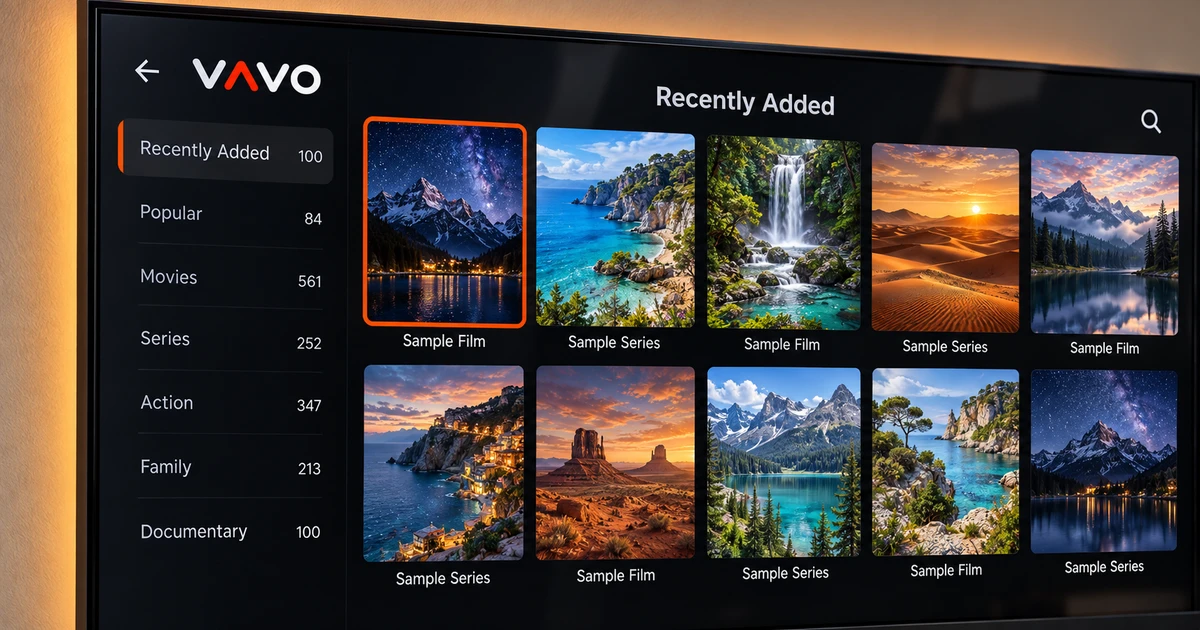

Looking for a SIPTV alternative? Consider how you want to discover films and series on your own television. Vavo Player combines a visual library, favourites, search and Continue Watching. Explore LG and Samsung platforms, with Windows and Mac options for your computer. Try it free for 60 days with your own media and see how it fits your screen.
- Visual film and series library
- LG, Samsung and desktop options
- 60 days free trial
Choose a player that helps you choose a film
When you sit in front of the television, sometimes the name of the content you will watch is clear. Another evening, you want to browse your libraries and decide. Vavo Player's visual library of films and series addresses both of these needs. Categories and search allow you to find specific content; cards and favourites create a familiar space for you to find your own selections again.
The reason for switching from SIPTV to another player may be a more visual library layout. So try Vavo Player with your own movies first. Card view, category selection and returning to the unfinished video are good starts for you to see the difference in daily use. Complete several actual viewing sessions rather than just looking at the app opening.
Vavo Player handles the library and playback experience of your own authorised media sources together. Finding content to watch, adding it to your favourites, and returning later are all part of the same personal routine. This approach allows you to proceed through your own choices, rather than having to familiarize yourself with your library every time you open the application.
Find the Vavo Player option for your LG or Samsung TV
Check out the webOS experience on our LG TV player page, and the Tizen option on our Samsung TV player page. You can start with your own media for your compatible television model. Selecting a card with the remote control, switching between categories and returning to favourites are practical operations that you can evaluate from your screen distance. See the TV advantage of Vavo Player in this daily use.
SIPTV's current official news includes LG, Samsung and Android-based TV versions. So don't reduce the comparison to just whether an app is installed on the TV or not. See how you use Vavo Player's movie and series library, Continue Watching section and personal choices. Your choice should be based on the experience on your own television.
Also evaluate existing audio and subtitle tracks during the trial. Support for your TV model and source is important. Do not attribute detailed subtitle display or display settings in Windows to all TV versions the same. The corresponding Vavo Player page and free trial allow you to use the features appropriate to your device with clear expectation.
Keep your unfinished video easy to find
When you wake up without finishing a movie, it should be easy to go back to the same content the next day. Vavo Player's pick-up area provides a starting point for this need. You can select the unfinished video from your own library and return to the viewing session. Favourites keep the content you want to watch in the future in a separate place.
In the Windows experience, you can see the remaining time information of the Continue Watching list and remove content you no longer want. Season tabs and unfinished episode tags in series help you choose the right episode. Using or cancelling the next episode countdown also leaves the flow of your session up to you. Vavo Player's personal library approach finds its value in daily use with these small conveniences.
Don't assume that the history of different devices will automatically be moved to a common area. Create your own resources, favourites and preferences for each screen. So you can base the player research on the convenience of the version you will actually use. When choosing Vavo Player, consider how it feels to find the content you return to most often.
Take your personal library to a computer
If your search for a SIPTV alternative includes the need to watch on a computer, start with our media player for Windows page. In Vavo Player's desktop experience, visual cards, category search and sorting preferences help you use your own library in a wide range of areas. Mouse navigation and in-window playback adapt to daily use of your computer.
On Windows, you can select content with a genre filter, review recently added content, and view existing content information. Adjusting the card size or name display preference allows you to use your library according to your own reading habits. Minimizing to a mini player while watching is a tangible convenience you can use to free up space for another task on the computer.
If you're on a Mac, check out macOS media player. The features and compatibility of the platforms should be evaluated separately. The prominent advantage of Vavo Player at this point is that you can research television and computer selection in the same product family. You can start with the display you use most often and then plan the premium usage you really need for other devices.
Try playback preferences with your own media
The decision you make in the visual library should continue smoothly when the video starts. Use existing audio and subtitle tracks in Vavo Player. On Windows, you can edit the playback speed, display preferences and subtitle appearance according to your own content. Evaluate how these processes work with videos you use frequently in the experiment. Also open your contents with different audio tracks. Try the language selection on your own screen according to your daily habits.
- Adjust the size, colour and background of the subtitle according to your own reading habits on the desktop.
- See buffer preference on supported platforms. Evaluate your connection with an in-app speed test.
- Create your own personal layout by using the archived favourites and Continue Watching section between your playback sessions.
See the everyday value of Vavo Player
| Your priority | Vavo Player experience | What to try |
|---|---|---|
| Choosing a film | Visual cards, categories and search. | The convenience of finding content in your own library. |
| Returning to watch | Favourites and continue where you left off. | Back to the same content another day. |
| Desktop library | Separate platform options for Windows and Mac. | Desktop use that fits your screen. |
| Choosing a licence | 60 days free trial. | Features that you care about in your actual use. |
Try for 60 days, then choose a $9 or $18 licence
Vavo Player licensing options are $9 for 12 months on a single device or $18 one-time for lifetime use. Annual licence renews with new purchase; There is no automatic renewal fee. Each licence is tied to one device. If you want separate premium use on TV and computer, re-evaluate your number of devices.
Use the 60-day trial at your own expense. Vavo Player does not provide movie, TV, channel or media subscriptions; Opens licence software features. Create your new layout without assuming that your account, favourites and settings will be automatically transferred when coming from SIPTV. Keep a copy of your source information and add your own authorised media.
Questions before you switch
Can I start with my existing TV?
Check model compatibility on the relevant LG or Samsung platform page. You can start with your own media on your supported device.
Is the licence valid for all my devices?
One Vavo Player licence is tied to a device. A separate licence should be evaluated for separate premium usage.
What should I see during the trial?
Try library search, return to favourites, unfinished video and playback controls on your own device in a few real sessions.
Try Vavo Player for your personal TV library
In your search for a SIPTV alternative, highlight Vavo Player with its ease of selection and return to viewing in your own library. Start from the platform appropriate for your device, add your media and use it free for 60 days. Let your purchasing decision be based on the daily comfort offered by the application that you will open again every evening.
This article was prepared by Vavo Player Team. SIPTV's TV platform information was reviewed on the official news page on October 7, 2026; may change. Brands are independent. Vavo Player features should be evaluated according to the version you are using.
Find your Vavo Player experience.
Explore the features for your screen and try Vavo Player with your own media.