Smarters Pro alternative in 2026: Vavo Player for your library
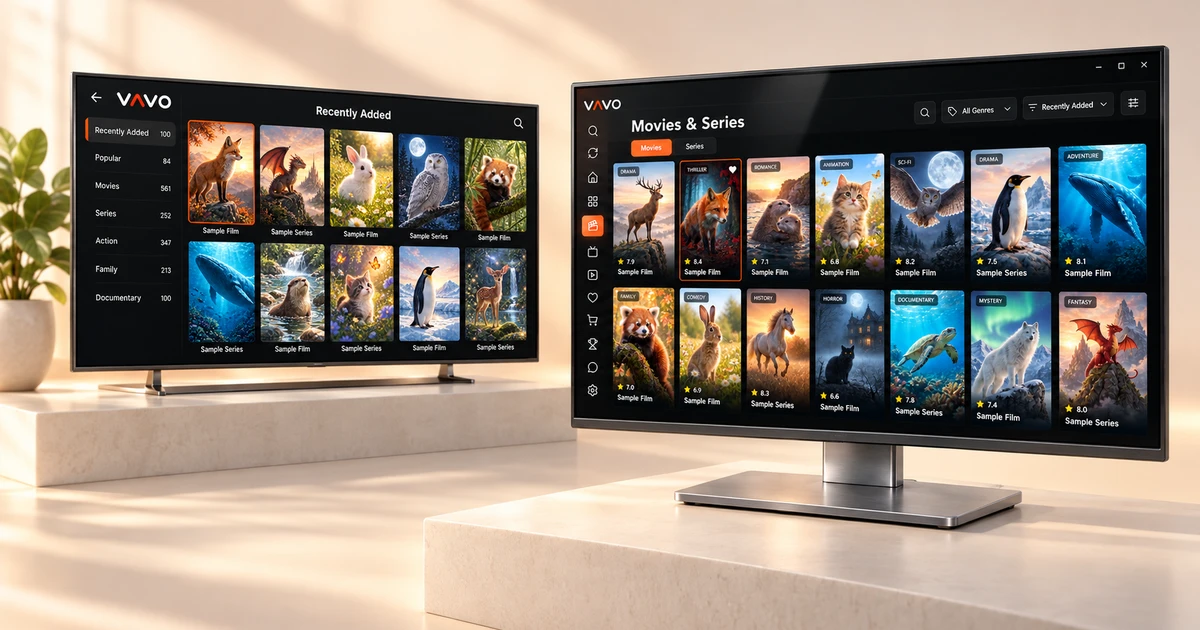

Looking for a Smarters Pro alternative? Start with Vavo Player. Browse your own library, return to an unfinished episode and watch with controls that suit your screen. Vavo Player brings these everyday needs together in a visual media experience, with options for LG and Samsung TVs, Windows, Mac and Android. Try it free for 60 days before choosing a licence.
- Platform options for LG and Samsung TV
- Visual library, favourites and Continue Watching list
- 60 days free trial · $18 for life
Choose a more personal viewing space with Vavo Player
The decision to change a player often starts with a small need: finding the last movie you added, returning to the same category again, or remembering which episode you left off in a series. When the application makes these tasks easier for you, your library is no longer just a list. Vavo Player's standout approach is that it combines the way you find and return to watching your own content.
When choosing a Smarters Pro alternative, don't just look at the number of supported devices. Also look at the layout of the screen you'll use every day, how to access your favourites, and what settings you can change during playback. Vavo Player: With its visual movie and series library, clear categories and Continue Watching list, it makes this daily experience your choice.
This difference is tangible, especially for someone who uses his own library regularly. You can add the movie you want to watch in the evening to your favourites in advance, review the recently added ones, and select your unfinished video from the Continue Watching section instead of searching again. Choosing Vavo Player is to prioritize the application to offer you a more comfortable viewing layout.
An LG TV option you can evaluate now
If you are using an LG television, the important detail in this comparison is the status of the platform. On the Smarters Pro page reviewed on October 7, 2026, the LG version is shown as “coming soon”. Vavo Player offers a separate platform page for LG webOS. As someone looking for LG TV player, you can start by directly examining the model compatibility of your own display and the features offered.
Vavo Player's LG experience features movie and series libraries, remote navigation, favourites, search and continuing where you left off. What you want to see when you sit in front of the TV is a viewing area suitable for the device you use. It makes a difference to put these basic operations in a clear order to find and play the content in your library.
For your Samsung screen, you can proceed from our Samsung TV player page. Finding the option suitable for your television under the same brand allows you to manage device research more easily. Check the compatibility of your TV and the features of the relevant platform before purchasing. Use the 60-day trial with your own media.
A desktop experience on your computer, touch controls on your phone
Your viewing habits on your Windows computer are different from those on your television. You move between categories with the mouse, minimize a video and do another task, or organise your library in a larger area. Vavo Player's desktop experience combines this usage with visual media library and playback controls. Evaluate it for your own computer, starting from the screens on our media player for Windows page.
You can keep track of your unfinished content on the desktop, search within categories, and edit your viewing preferences. When you shrink the supported video to mini player, you can manage your viewing session more flexibly. Changing subtitle and playback settings within your daily use is also part of the same experience. These features turn Vavo Player into a library area on your computer that you will want to open again and again.
If you're using a Mac, check out the macOS media player page, if you're watching from a phone, check out the Android media player page. Touch navigation and supported offline viewing on Android open up other usage options to suit your display. On Smarters Pro's reviewed download page, Windows and Mac versions are marked as beta; When comparing Vavo Player, you can see the use of libraries and controls on your own device during the trial period.
Keep your library organised, from new additions to unfinished episodes
As the library grows, finding the content you are looking for becomes important. Examining the latest additions in Vavo Player's desktop library, searching within the category and changing the sorting adapts to your daily use. One evening you look for a new movie; Another evening, you just want to return to the series you follow. The app needs to provide a clear way to meet both of these needs.
Movie and series cards, content information and episode order help you make your choice. On the desktop, you can look at the movie summary, open the trailer, and browse through the seasons to select the episode you want to watch. Marking the section where you started earlier makes it easier for you to make decisions without re-scanning the library. The value of Vavo Player is that these little conveniences work together in every viewing session.
Favourites and Continue Watching lists bring your library to your own order. Favorite a content with the heart button; Return to the unfinished video from the Continue Watching section. On the desktop, you can remove the item you no longer want from the Continue Watching list and see the remaining time. This approach reduces the amount of work you have to remember to organise your own media, making the switch from Smarters Pro meaningful to your daily routine.
Keep the playback controls you need close at hand
A good library experience should continue once the video starts. You shouldn't have to restart your viewing session to choose the audio language, change subtitles, or return to where you left off. Vavo Player allows you to tailor your favourite playback operations to the needs of your particular media.
- Select available audio and subtitle tracks during playback. Adjust the appearance of subtitles in the Windows experience to your own reading preference.
- Pick up where you left off with supported videos. Use the next episode countdown on desktop or cancel when you don't want to continue.
- On supported platforms, change the buffer setting as per your need. Evaluate the health of your connection with an in-app speed test.
- Find the content you want to reopen more easily, thanks to favourites, category layout and search.
- Make space for your other work while managing your video session with the mini player on the desktop.
The advantage of Vavo Player is that it offers these operations as part of your personal media experience. See which settings work for you with your own videos during the trial period. Since features may vary by platform, check the functions you will use on your TV or phone on the relevant device page.
Compare the differences that matter to your screen
What makes Vavo Player stand out is directly related to the device you use and your daily viewing pattern. Evaluate library navigation, device option and trial-before-purchase opportunity together.
| Your priority | Vavo Player advantage | Smarters Pro: what to check |
|---|---|---|
| LG television | Separate platform page for LG webOS; library, favourites and remote control. | On the official page reviewed, the LG version is shown as "coming soon". |
| Desktop options | Device pages for Windows and Mac; Evaluating the library and playback experience on your own screen. | Reviewed Windows and Mac downloads are marked as beta. |
| Everyday library | Visual movie and series library, Continue Watching list, favourites and clear category layout. | It is necessary to separately evaluate the library layout and controls of the version you will use. |
| Licence scope | 12 months $9 or one-time $18 lifetime licence for single device. | It is necessary to check the Premium conditions on the platform you will use before purchasing. |
| Trying before buying | 60-day free trial with your own device and media. | The current usage and purchasing conditions of the platform should be evaluated. |
Vavo Player is a strong choice, especially for someone who is looking for a direct option on their LG television, uses their library regularly on their desktop, or wants to make their licensing decision after a long trial. When you put your own screen at the center of the comparison, the daily conveniences the app offers you become clearer.
Try it for 60 days, then choose a $9 or $18 licence
In Vavo Player, the 12-month licence for a single device is $9, and the lifetime licence is one-time $18. You renew the annual option with a new purchase whenever you need it. In the lifetime option, there is no licence renewal payment for that device. Vavo Player licence options makes your payment decision clear from the very beginning.
The 60-day free trial is for you to make that decision for your own use. Don't just open and close a video. Create your favourites, search your library, watch several episodes of a series, and experiment with your subtitle preferences. The way to really get to know a player is to include him in your daily viewing routine.
What stands out about Vavo Player here is that you can evaluate your own experience before purchasing. The licence unlocks features of the application; does not provide movie, channel or content subscriptions. One licence is tied to one device. If you want separate premium use on your television and computer, evaluate your licensing needs for each device.
Begin with the screen you use most
Your own authorised media sources are the starting point when changing players. Choose Vavo Player for the device you use most, then build your library around the new experience.
- Check out the appropriate option for your television, computer or Android device among Vavo Player platforms.
- Add your own compatible playlist, server information or supported local videos.
- Create your favourites and category layout. Try audio, subtitles and continuation features with the content you watch frequently.
- After using the 60-day trial, choose an annual or lifetime licence for that device.
Keep a copy of your source information. Organize your own library in Vavo Player without assuming that your favourites and settings in Smarters Pro will be automatically moved. As someone looking for a Windows IPTV player, you can start with our desktop option and then evaluate the appropriate platform for your television.
Questions before you switch
Can I choose Vavo Player as an alternative to Smarters Pro on an LG TV?
Vavo Player has a platform page for LG webOS. You can check the model compatibility of your television and consider a 60-day free trial with your own media.
Will the same licence power on my computer and TV?
Each Vavo Player licence is tied to one device. Separate licence is required to use premium features on another device.
Smarters Pro Will the favourites in my account be moved automatically?
We do not promise automatic transfer. You can add your own media sources to Vavo Player and create your favourites and settings within the application.
Does Vavo Player sell content or subscriptions?
Vavo Player is media player software. Purchasing unlocks app features. You add your own authorised media sources.
Give your everyday viewing more room with Vavo Player
Start your search for a Smarters Pro alternative with Vavo Player. Platform options for LG and Samsung, desktop approach for Windows and Mac, touch operation and visual media library on Android allow you to make a choice suitable for your own screen. The layout, which extends from favourites to the section you left off from, pays off this choice in daily use.
Choose your own device, add your media and try Vavo Player free for 60 days. Once you see the compatibility with your library, consider a $9 annual or $18 lifetime licence for a single device. When choosing your player, your priority should be the experience you will use every day.
About this comparison
This article was prepared by the Vavo Player Team for users who evaluate our product. Smarters Pro's LG status and desktop version labels were reviewed on October 7, 2026. The availability of platforms and features offered may change over time.
The name Smarters Pro is used to identify the product being compared. Vavo Player is independent of Smarters Pro and its developer. Vavo Player features and compatibility should be evaluated according to the platform you will use.
Find your Vavo Player experience.
Explore the features for your screen and try Vavo Player with your own media.