SS IPTV alternative: Vavo Player for a visual TV library
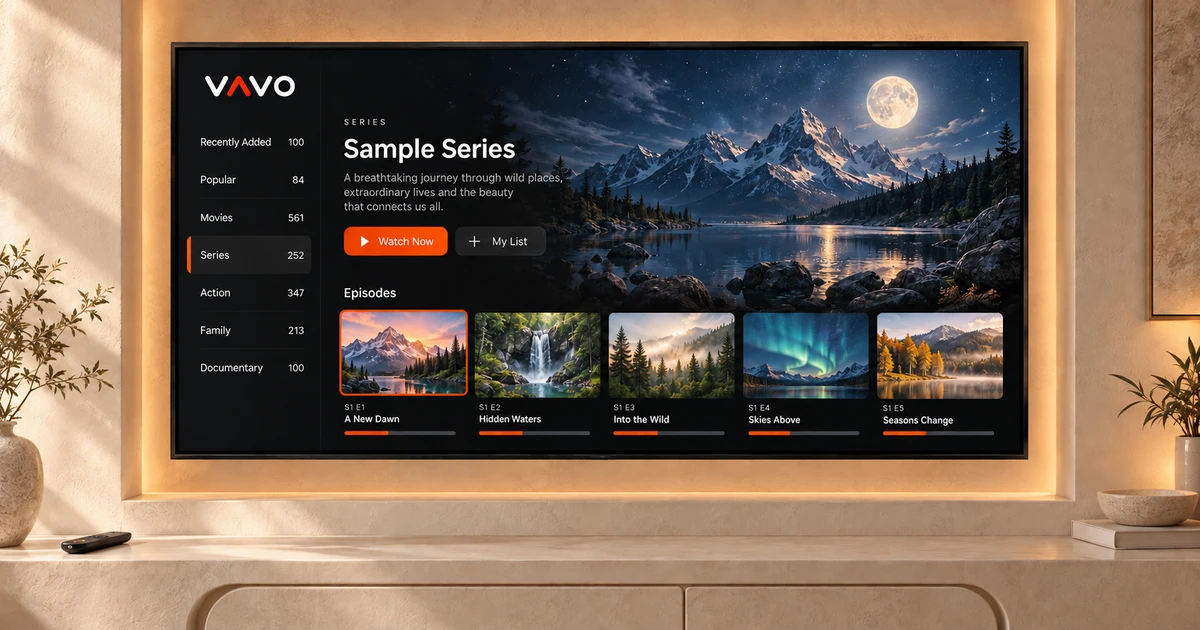

Looking for a more visual, personal TV library as an SS alternative? Consider Vavo Player. Return to your films, follow a series and browse comfortably with the remote. Explore the option for your LG or Samsung television and try your own authorised media for 60 days free. Choose a licence based on real use of your screen.
- Visual library for LG and Samsung
- Favourites and continue where you left off
- 60-day trial · single device licence
Put your film evening at the centre of the choice
Using your own TV list may be the first necessity in your player selection. Over time, choosing which movie to open, returning to the unfinished series, and personalizing your library also becomes important. Vavo Player brings together these daily needs around a visual film and series library. You can set up an area where you want to access your own media again.
The examined page of the SS application explains areas such as personal lists, video library and program guide. When recommending Vavo Player, we do not rely on the claim that there is no library on the other side. The difference we highlight is how the visual selection, favourites and continuation approach are used together in our own TV experience.
Check out the usage and library experience with the remote control on our LG TV player page. If you have a Samsung TV, check the Samsung TV player option for your model. The right start depends on which app name is more familiar, as well as what kind of viewing area you want on your own screen.
Rediscover your collection through visual cards
At the beginning of a movie night you don't always know what to watch. An image you recognize may help you make a decision, or you may notice content you forgot in your library. Vavo Player's visual card approach allows you to use your personal movie and series collection in a more inviting space on your television.
Search offers a more direct path to the title you have in mind. Favourites help you separate the content you want to return to the next evening. Using these fields together allows you to progress through your library from your own selection instead of starting from the same long row each time.
Images and content information depend on the data in your source. Use your real collection during the trial period; Do not make evaluations limited to empty libraries or single content. How Vavo Player displays your media and is used on your television is a concrete start to a purchasing decision.
Choose for comfortable navigation from the sofa
Using libraries on television is different from file browsing on a computer. You look at the screen from a distance, move with the remote and follow your choice. Evaluate Vavo Player's LG and Samsung platforms with this real use case. Visual library, search and favourites provide different entry points into your daily viewing session.
Open the app several times and select different content. Proceed from a favourite one evening, and an unfinished section another evening. See how comfortable these roads feel to you with the remote control. The 60-day trial allows you to get to know Vavo Player through your actual TV habit rather than deciding solely on first appearance.
Return to the series where you left off
While following a series, you may not want to search for your episode again each time. The continue where you left off area in Vavo Player makes it easy to return to unfinished content. You can also evaluate this approach by splitting the movie into several evenings with sessions on your own television.
Favourites and Continue Watching section complement each other. One is useful for returning to content you want to watch later, and the other for returning to the session you've already started. Vavo Player's personal layout consists of the choices you make with your own media. Consider each screen separately, without assuming that the history on other devices will automatically be shared.
Find a Vavo Player option for your computer too
You may want to use your own media sometimes on television, sometimes on your computer. You can examine the desktop library and playback features on Vavo Player's media player for Windows page. Genre filter, in-category search, season tabs and mini-player provide concrete options for your use on PC.
The Mac platform is also a separate option that you can evaluate with its own features. This broad catalog of platforms does not mean that all controls are the same on every screen. Remote, mouse or touchscreen usage creates different needs. Choosing Vavo Player according to your device will get you started with the experience you've been waiting for.
Choose your sources and enjoy a personal library
Vavo Player is a media player software that allows you to evaluate your own resources with compatible M3U lists or supported server information. Your resource's access terms and content rights apply to your use of that resource. Using your own movies and series in a visual field is the subject of software selection.
The licence does not include channel, movie, series or media subscriptions. Opens software properties. You add authorised sources. Keep your own source information ready when switching from another application and create your own layout in the new player. Don't make decisions assuming old favourites or watch history will be automatically migrated.
Clear licensing for one device, with 60 days to decide
Vavo Player licensing options are $9 for 12 months on a single device or one-time $18 for lifetime use. A new purchase is made to extend the annual period; There is no automatic renewal fee. One licence is tied to one device. If you want premium use on a separate television or computer, consider that screen separately.
The value of changing players lies in the ease of using your own library. Watch your films, return to a series and build your favourites during the 60-day free trial. Choose a licence once Vavo Player has found a useful place in your daily viewing.
Your TV model and software version may differ. Check out the features on the relevant platform page according to your device. Use the trial period to evaluate how your own display and media sources work together.
Compare the everyday benefits of Vavo Player
| Your priority | Vavo Player experience |
|---|---|
| Choosing films and series | Visual cards and search in your own library. |
| Remote navigation | Separate platform experiences for LG and Samsung. |
| Returning to watch | Favourites and continue where you left off. |
| Desktop options | Separate platform pages for Windows and Mac. |
| Choosing a licence | 60-day free trial and open single device price. |
Questions about Vavo Player as an SS alternative
Why should I consider Vavo Player?
If you want to use a combination of visual selection, remote navigation, favourites and the Continue Watching section for your own TV library, start with the 60-day trial.
Is the licence valid on all devices?
Each Vavo Player licence is tied to one device. Also consider premium use of the second screen.
Is a media subscription required?
Vavo Player does not sell content subscriptions. You must include compatible resources that you have the right to use yourself.
Our recommendation for your TV library: Vavo Player
If you want to return to your personal movie and series library in a more visual way instead of SS, consider Vavo Player. Start from the platform suitable for your LG or Samsung display. Try it for 60 days with your real media. Make your licensing decision after the comfort of daily use with the remote control.
Choose a few familiar movies from your own collection and return to them on different evenings. Starting with your favourites and visually navigating the library can meet different needs. Seeing which area is more in your habit makes your new application choice more concrete. This is how you can evaluate Vavo Player's TV experience on your own screen.
This article is Vavo Player Team's recommendation for users evaluating their product. SS is an independent third-party product; There is no affiliation or endorsement. It makes no claims of measured performance superiority.
Find your Vavo Player experience.
Explore the features for your screen and try Vavo Player with your own media.