The best TiviMate alternative in 2026: Vavo Player
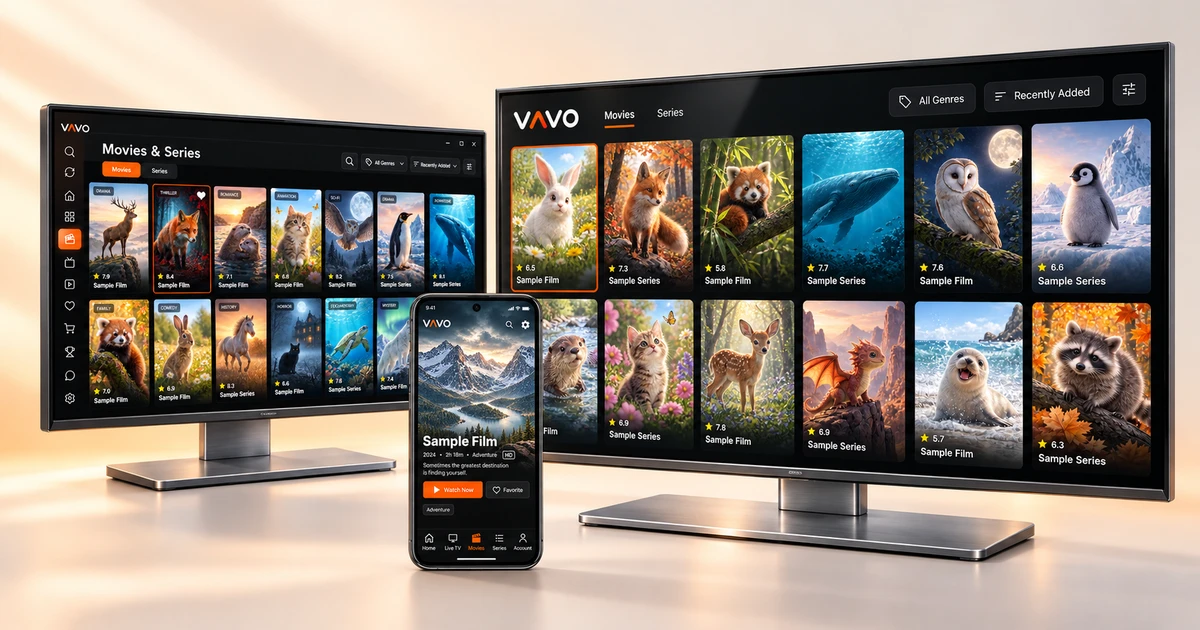

Looking for a TiviMate alternative? Choose a player that fits your screen, presents your films and series clearly, and makes everyday viewing easier. Vavo Player brings a modern media library to TV, desktop and Android mobile. Try it free for 60 days, then choose a $9 licence for 12 months or $18 lifetime access for one device.
- TV, computer and Android mobile
- Visual library and continue where you left off
- 60 days free trial · $18 for life
Go beyond TiviMate’s Android TV focus
Player selection starts with which device the application is designed for. The stated focus of TiviMate is use with Android TV and remote control; The developer states that it is not optimized for phones and tablets. If your viewing habits include your computer, Android phone, or television with a different operating system, this focus may be narrow to your needs.
Vavo Player gives you a wider selection: Windows, macOS, Android mobile, Android TV, Fire TV, LG webOS and Samsung Tizen. You can choose the player suitable for that screen without changing the brand of your television or the computer you use daily. The most obvious advantage of Vavo Player over TiviMate is that it does not limit your viewing experience to a single device family.
For example, if you want to open your own movie library on your LG television, you can start from our LG TV player page. For your Samsung screen, you can check the Samsung TV player option. These are straightforward options that you can consider for your current display before looking for another device connected to the television. You can see model compatibility and the features of the relevant platform on its page.
More than a channel list: a library you will want to explore
If you have a large library, simply seeing the contents in a long list of names is not enough. You want movies you recognize by their posters, clear categories, easy-to-access favourites, and a path to your unfinished videos. Vavo Player puts exploring your own media at the heart of the interface. Choosing a movie is no longer a job where you get lost in menus.
In Vavo Player's desktop experience, you can browse the recently added content, review the information of movies and series, open their trailers and edit your favourites with a single click. When you continue a series, instead of finding the seasons and episodes separately, you proceed with a clear episode order in the library. Signs reminding you of the unfinished episode make it easier to keep track of what you're watching.
That's what the visual difference means for choosing Vavo Player instead of TiviMate: you're not just using the app as a tool to open broadcasts. You get a more organised viewing area for your own movie, series and video collection. You can see how this approach will fit into your library by reviewing the screens on our media player for Windows page.
Choose an experience that fits your screen
You navigate the television with the remote control from your couch. You want to make faster selections with a mouse and keyboard on the computer. On the phone, the button you are looking for should be under your finger. Vavo Player's platform options are prepared for these different usage styles. You can proceed from the page appropriate to your device without having to use a television layout on every screen.
If you're looking for Windows IPTV player on your computer, check out Vavo Player's desktop library and playback controls. If you are using a Mac, you can go to our macOS media player page. Treating your local videos and your own compatible sources on your computer with the same player approach makes Vavo Player a more natural part of your daily media consumption.
Android media player for mobile use. It stands out with touch navigation and supported offline viewing options. On the big screen, Android TV player and Fire TV player pages show the experience suitable for your use with the remote control. Broad platform selection does not mean unlimited devices with one licence: each licence activates one device, and features may vary by platform.
See the difference in everyday viewing
The value of an application is not determined only by the screen you see when you first open it. It is more important how easily you find the movie you are looking for after a few days, how you return to the unfinished episode, and how many steps you take to change the subtitle. Vavo Player considers frequently used operations together. It establishes a clearer flow between library and playback.
- Pick up where you left off: pick up where you left off, instead of starting over with supported videos. See the remaining time in the desktop library and remove the item you no longer want from the Continue Watching list.
- Quick search and categories: find what you're looking for in your own library of movies, series and live broadcasts. Start navigating between your different resources more easily by organizing multiple lists.
- Favourites: mark the content you want to reopen with a single click. Don't have to search through the entire catalog for items you use daily.
- Subtitles and audio to suit you: replace existing audio and subtitle tracks while watching. Customize the appearance of subtitles and supported playback settings to your preference in the Windows experience.
- Series streaming: use or cancel next episode countdown on desktop. Use the library's episode layout when deciding when to continue.
- Evaluate your connection: change the buffer setting on supported platforms and check the health of your connection with an in-app speed test.
The combined benefit of these features is that you can get into viewing with less preparation. Don't think of switching to Vavo Player as just changing the app name: think of it as a choice that improves the way you find, personalise, and continue viewing the library. You can check which features are available on your device on the relevant platform page.
Reasons to choose Vavo Player over TiviMate
The right alternative for you should free up more space for the screen you use and the types of media you watch. The comparison below shows which needs Vavo Player offers a stronger choice.
| Your need | Vavo Player advantage | TiviMate focus |
|---|---|---|
| Choosing a device | Seven platform options for TV, Windows, Mac and Android mobile. | Usage with Android TV and remote control. |
| LG and Samsung TVs | Direct platform options for LG webOS and Samsung Tizen. | The announced usage focus is Android TV devices. |
| Phone and tablet | Android experience suitable for touch use; supported offline viewing. | It is stated that it is not optimized for phones and tablets. |
| Media library | Visual navigation around movies, series, local video, favourites and Continue Watching list. | Use around playlists and broadcast guide on television. |
| Lifetime price for one device | $18 single payment; does not require licence renewal on a device. | Reference price July 2026: $33.99 for up to five devices. |
| Trying before choosing | 60-day free trial on your own device and media. | Trial and Premium conditions should be checked according to the purchasing channel. |
The common result of these differences is that Vavo Player can be preferred for more display types and a wider range of personal media use. If you are considering your computer or Android phone along with your television, you have concrete reasons to put Vavo Player at the top of your selection list.
Clear pricing for one device: $9 a year or $18 lifetime
Licence selection in Vavo Player is easy to understand: 12 months of use on one device is $9, lifetime use is one-time $18. You renew the annual option with a new purchase whenever you need it. In the lifetime option, there is no licence renewal payment for that device. You know up front what you're buying and how much you'll pay.
The published July 2026 reference rates for TiviMate are annual $9.99 and lifetime $33.99. The initial amount you pay to activate a single device is lower in Vavo Player, $0.99 annually, $15.99 lifetime, compared to these costs. The device difference in the comparison is clear: TiviMate's stated lifetime package covers up to five devices, Vavo Player's $18 licence covers one device. Current competitor prices may vary by region, tax and purchasing channel.
Moreover, you can make the decision before purchasing. Open your own library, start a series, change subtitles and create your favourites with a 60-day free trial. Try using Vavo Player in your daily routine. You have time to see which amenities are important to you, rather than settling for a few minutes of first impressions.
Start the move to Vavo Player with your own device
The screen you watch most often is the best place to start. See the experience on that device first. Then evaluate your needs for your other displays.
- From Platforms page, select the appropriate Vavo Player version for your television, computer or Android device.
- Add your own authorised playlist, compatible server information, or supported local videos.
- Try search, favourites, subtitles and pick up where you left off with the content you watch every day.
- Use the app according to your own habit during the 60-day trial; then select annual or lifetime licence for that device.
Keep a copy of your own source information when switching applications. You can create your favourites and settings in Vavo Player: Organize your library at your convenience, without assuming that another application's history or records will be automatically migrated.
Choose Vavo Player for a broader viewing experience
If you are looking for an alternative to TiviMate, consider Vavo Player first. Instead of focusing on a single television usage, you can choose an experience that suits your particular screen. Visual movie and series library, local videos, easily accessible favourites and return to watch flow make this selection meaningful in daily use.
$18 lifetime licence for single device and 60-day free trial also make your decision easier. Use it with your own media first, then choose your licence. The benefit of Vavo Player starts with the device option and extends to the controls you use every day.
Questions about switching from TiviMate
Can I use Vavo Player on my LG or Samsung TV?
Vavo Player has platform pages for LG webOS and Samsung Tizen. You can review the model compatibility of your television and the features of the relevant version on these pages.
Is there a separate option for Windows and Mac?
Yes. Desktop-friendly Vavo Player options are available for Windows and macOS. You can evaluate the library and playback experience from your own computer's page.
Does one licence activate all my devices?
Each Vavo Player licence is tied to one device. A separate licence is required to use premium features on another device.
Do movies or channels come with purchasing a licence?
Vavo Player is media player software. The licence unlocks features of the application; does not provide movie, channel or content subscriptions. You use your own authorised media sources.
About this comparison
This article was prepared by the Vavo Player Team for users who evaluate our product. Platform information was reviewed on October 7, 2026. TiviMate prices are July 2026 reference prices. It is not an offer taken from the current payment screen.
The name TiviMate is used to identify the product being compared. Vavo Player is independent of TiviMate and its developer. Features and compatibility may vary depending on the platform you use.
Find your Vavo Player experience.
Explore the features for your screen and try Vavo Player with your own media.