KMPlayer alternative: Vavo Player on TV and desktop
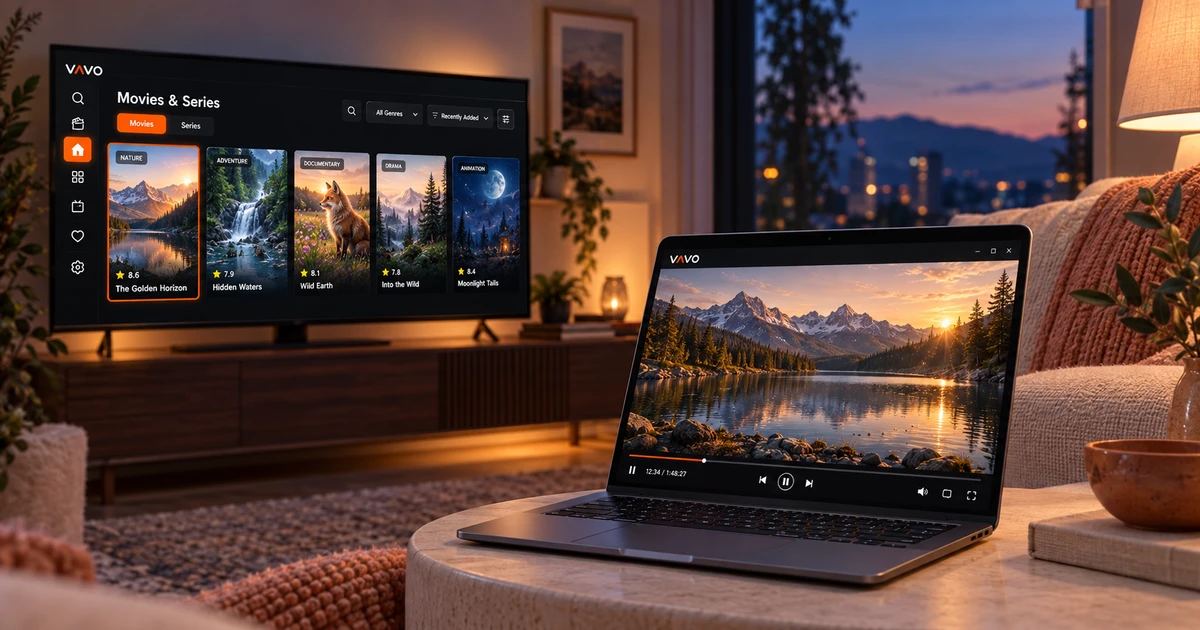

Looking for a KMPlayer alternative? Consider your television as well as your computer. Vavo Player offers a visual film and series library, personal playback controls on Windows and separate options for LG and Samsung TVs. Try your own authorised media for 60 days free. Once you have a library you enjoy returning to, choose the licence for your device.
- Visual library and Windows controls
- Separate TV options for LG and Samsung
- 60 days free trial
Consider your whole viewing experience
It matters which file a video player can open. However, when you are looking for a new application, your expectation may not only be the opened file. You may want to choose movies, follow your series, and use your own media on another screen. Vavo Player's proposal is to combine the library and playback experience in a personal layout.
KMPlayer's reviewed product pages describe Windows and mobile options. In this product family, features differ depending on the version. For example, the 64X version comes without ads; Placing an advertising claim on all KMPlayer versions does not constitute an accurate comparison. The difference we highlight for you to choose Vavo Player is our own library approach and supported TV platforms.
Check out the Vavo Player experience for your computer on our media player for Windows page. Watch how you move as you navigate the library and after the video starts. Your daily routine with your own media may be a more meaningful measure of your choice of new player than any single feature.
Choose what to watch from a visual collection
As your own collection grows, you may not remember every ingredient name. Vavo Player's visual movie cards help you distinguish content you recognize in your library. In Windows, genre filter, category search and newly added offers different selection ways. Every session doesn't have to start from the same long list.
Reviewing the content information, available synopsis, and trailer will help you get a feel for the movie before opening it. Images and information depend on data from your source. Use your real library in the trial. You can evaluate the appearance of your collection according to your own screen with card size, name display and sorting preferences.
Vavo Player's archival approach is not limited to looking stylish at first glance. It's important that you feel comfortable choosing what to watch when you return to the same collection a few weeks later. Favourites and a Continue Watching section also allow you to move forward in your library from your own decisions.
Give your series a personal home beyond file names
The right episode and the right starting point are important in following the series. In Vavo Player's Windows experience, season tabs and unfinished episode markers make it easy to return to the content you're following. The remaining time in the Continue Watching section can help you decide based on the time you have available that evening.
It is your choice to continue the session with the next episode countdown or cancel and take a break. You can remove the content you no longer want to watch from the Continue Watching list and add another movie to your favourites. These smaller options serve to help you start from your personal choice rather than scanning your entire collection in the same order.
Use playback controls that suit your screen
Controls such as audio and subtitle track selection, display preferences or playback speed are a daily need for many users. You can evaluate these preferences with your own media in Vavo Player. Adjusting the size, colour, and background appearance of subtitles in Windows gives you options for reading comfort on your computer screen.
KMPlayer also has various playback controls. Vavo Player's suggestion is not to declare them unique per se. Evaluate whether the whole, from visual library to season tracking, from personal controls to mini player, fits your habits. Minimizing the video session and moving to another area of your computer may also be part of your desktop usage.
Explore LG and Samsung alongside your computer
KMPlayer's list of official reviewed platforms describes Windows and mobile options; No separate versions are listed for LG webOS or Samsung Tizen. If you want to return to your own movie library on your television, Vavo Player's LG TV player and Samsung TV player pages offer suitable starts for your screen.
Check out TV remote navigation, visual cards, favourites and pick up where you left off experience. Do not assume that all detailed settings on the computer are the same on the TV. Each Vavo Player platform should be evaluated for its own display and usage. These options allow you to search for players based on your device.
Choose one product approach for your media
You can evaluate your own compatible lists and supported local videos in Vavo Player. Personal recording, movie library, series or your own live sources can meet different viewing habits. The important thing is that you have the right to use them and look at the features that your particular platform supports.
Vavo Player is not a channel, movie or series provider. The software licence does not include a media subscription. You add your sources. Therefore, your decision to switch to the app depends on how you want to use your own media. Evaluating your real library in a trial shows more clearly the value the software offers you.
Choose your device licence after a 60-day trial
KMPlayer has free options. To upgrade to Vavo Player's paid licence, you need to see value in your own use. If visual library, season tracking, personal playback and TV options meet your priorities, you can consider this for a 60-day free trial.
Vavo Player licence options are $9 for 12 months on a single device or one-time $18 for lifetime use. Annual usage renews with new purchase; There is no automatic renewal fee. One licence is tied to one device. If you want premium use on another TV besides your computer, consider that screen separately.
During the trial, open the movies and series you watch daily. Create your favourites, go back a few sessions and use your own playback preferences. The value of the licence depends on how much this experience finds in your daily use.
Compare the complete Vavo Player experience
| Your priority | Vavo Player | KMPlayer |
|---|---|---|
| Visual personal library | Movie cards, genres and content information on Windows. | Player product family; Usage varies depending on version. |
| LG and Samsung TVs | Separate experience for each TV platform. | These TV platforms are not included in the reviewed list. |
| Playback preferences | Audio, subtitles and Windows controls with library. | There are various controls; The absence of features alone cannot be claimed. |
| Price | $9 annual or $18 lifetime on a device. | There are free product options. |
| Trying Vavo Player | Try it free for 60 days with your own media. | Separate product and separate scope of use. |
Questions about switching from KMPlayer
What is the main difference of Vavo Player?
It combines a visual library of movies and series with a personal playback experience; Besides Windows, it offers TV options such as LG and Samsung.
Do all KMPlayer versions have ads?
No. The 64X page reviewed describes the ad-free version. Vavo Player recommendation is based on own experience rather than such generalizations.
Can movies come with a licence?
Vavo Player is the software licence. Does not include movie, series, channel or media subscriptions.
Our recommendation for TV and desktop: Vavo Player
If you want to return to your own movie library from a visual perspective, follow your series and find a suitable option for your TV, try Vavo Player. Start from the platform appropriate for your device. After using it with your real media for 60 days, choose the licence that suits you for a single device.
Consider the trial with multiple movie nights; See how your personal library feels when reused.
This article is Vavo Player Team's recommendation for users evaluating their product. KMPlayer is the third-party product name. It does not contain any affiliation, endorsement or claim of measured performance superiority.
Find your Vavo Player experience.
Explore the features for your screen and try Vavo Player with your own media.