Televizo alternative: a more organised media experience with Vavo Player
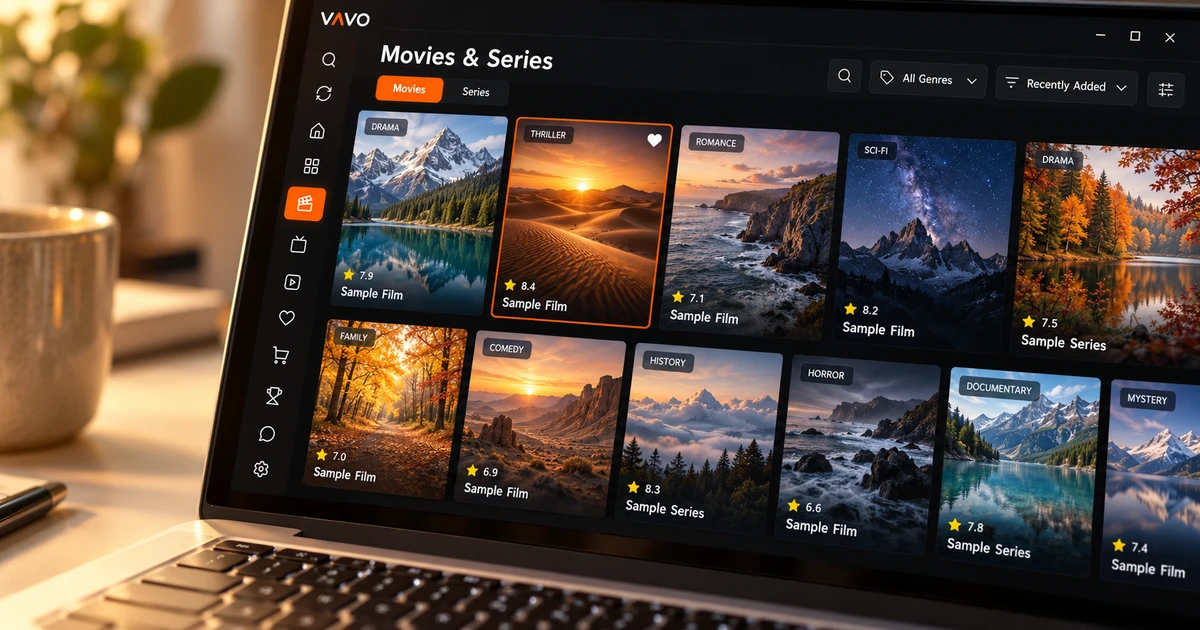

A Televizo alternative should do more than start a video. Finding a film, returning to an unfinished episode and browsing comfortably on your screen all matter. Vavo Player brings these needs together in a visual library, with Windows, Mac, LG and Samsung options alongside Android. Try favourites and Continue Watching with your own media during the 60-day free trial.
- Personal library and Continue Watching list
- Device options other than Android
- Try it for 60 days, then decide
Choose a library that supports your viewing routine
It's important for a playlist to work; But if you are looking for the same content again every evening, you have a different need for daily use. Vavo Player's approach combines finding content with returning to watch. Visual movie and series cards, categories, favourites and Continue Watching section. It comes together to create your own route in your library.
The official page of Televizo examined explains the use of Android phones, tablets and TVs. What makes Vavo Player stand out is that, in addition to this Android usage, it also offers separate options for your computer and supported televisions. You can do application research based on the device you use and your media habits. Start with the platform pages to see which version is right for you.
For example, one day of the week you search for a new movie, and on another day you return to the series you follow. When you want to watch your own recordings, you move to a different section of the library. The reason for choosing Vavo Player may be that it offers a layout that is open to these changing needs. Don't just open one stream during the trial period. Create your habit of using it for a few evenings.
Find what you want in a growing collection
As your library expands, search alone may not be enough. You remember the name of a movie, another time you only know the genre. In Vavo Player's Windows library, you can use options such as category search, genre filter and newly added. Thus, each choice does not start from the beginning of the same long list. You find a different way depending on your needs that evening.
Card size and name display preferences adapt to how you want to read the screen. The option to hide items without images also helps you organise the appearance of your desktop library according to your preference. These little details aren't just to look nice at first boot. It serves to use the library more easily when choosing content over and over again.
Looking at the content information, reading the synopsis, or opening the existing trailer can make your decision easier. Keeping the same visual approach when switching between movies and series allows you to get to know your own media. Check out this experience on our media player for Windows page. Try the detailed desktop features in your own library to see which ones help you the most.
Return to your unfinished episode
When following a series, remembering which episode you last watched is one task the app can make easier. Vavo Player’s Continue Watching section helps you return to unfinished videos. On Windows, season tabs and the resume label guide you to the right episode. The remaining time can also help you choose something that fits the time you have that evening.
You can remove the content you no longer follow from the follow-up list, and make a separate place for the movies you are really interested in with favourites. Thus, the start screen of the application is not just a dump of the entire library. It becomes a more personal space based on your choices. This layout is for your device's own use. Evaluate without assuming automatic synchronization of history across different screens.
Find options for a computer or TV alongside Android
A new computer or TV may be the reason why you are looking for another player instead of Televizo. Vavo Player has separate device pages for Windows and macOS, as well as television options for LG webOS and Samsung Tizen. Proceeding by examining the compatibility of your current display eliminates the need to choose a device based solely on an Android-focused app.
In the LG TV player experience, you can browse the movie and series library with the remote control and make selections via search and favourites. Check out the features suitable for your TV on the Samsung TV player page. On the computer, mouse use and controls suitable for desktop space come to the fore. Evaluating the details of each platform on its own page will allow you to start trying it with the right expectations.
You can check out the touch-friendly option for your Android phone. Features like supported offline viewing open up an additional way to use your own videos in different media. The advantage of Vavo Player is not to declare all versions the same, but to offer an experience that you can evaluate for your screen.
Watch with your own preferences
Start by selecting audio and subtitle tracks from your own media in Vavo Player. In Windows, adjusting the appearance of subtitles, changing the playback speed or minimizing the video session to a mini player allows you to adapt the way you watch to suit your needs. During the trial, compare these controls to your favourite videos.
- Edit a movie's subtitle size and colour on desktop to suit your own reading preference. A small adjustment can make a difference in a long viewing session.
- Use the next episode countdown in a series session. Cancel when you want to take a break. Let it be your decision to continue or stop.
- Consider buffer options on supported platforms. Use your resource on your own terms by examining the status of your connection with an in-app speed test.
Where Vavo Player makes a difference
| Your daily need | Vavo Player advantage | What to try |
|---|---|---|
| Screens beyond Android | Separate platform options for Windows, Mac, LG and Samsung. | Compatibility and ease of use with your existing device. |
| Choosing a film | Visual cards, category search, and genre filters on Windows. | The path you follow to make selections in your own library. |
| Unfinished series | Continue Watching section; partition layout and remaining time on desktop. | Procedures required when returning to the correct section. |
| Choosing a licence | 60-day trial and clear licence prices for a single device. | Features you prefer in your actual use. |
Consider these benefits with your own media when choosing Vavo Player. If you're leaving Televizo's Android scope for another screen, or if you want a more personal library layout in Windows, Vavo Player gives you a direct start.
Try your library for 60 days before choosing a licence
Vavo Player prices is offered as a 12-month $9 for a single device and a one-time $18 lifetime licence. Annual usage renews with a new purchase whenever you need it; There is no automatic renewal fee. If you plan to use separate premiums on television and computer, consider from the beginning that separate licenses are required for each device.
Add favourites, follow a series, and perform different searches in the library during your 60-day free trial. This experience bases your decision on your actual usage. Vavo Player software licence is not a content subscription. We do not provide channels, movies or series. You add your own resources that you have the right to use.
Questions about switching from Televizo
Will my favourites in Televizo be moved automatically?
We do not promise automatic favourite transfer. Add your own compatible sources and create your favourites and playback preferences in Vavo Player.
Which device should I start on first?
Start with the compatible display you use most often. For TV, see the relevant platform page, for PC, see Windows or macOS.
What should I evaluate for 60 days?
Try playing your own content, searching in the library, favourites and returning to an unfinished video. See the features of the relevant version in your daily use.
Create a library you will return to each evening
When looking for an alternative to Televizo, consider Vavo Player among your first choices. Start with the version appropriate for your device, add your own media, and organise the library according to your usage. When visual selection, favourites, and picking up where you left off work together, the player becomes more than just a place where you open a video. It turns into your personal viewing area.
This comparison was prepared by Vavo Player Team. Android coverage of Televizo was reviewed on its official page on October 7, 2026. Product features may vary. Brands are independent of each other and Vavo Player features should be evaluated by platform.
Find your Vavo Player experience.
Explore the features for your screen and try Vavo Player with your own media.