GSE Smart IPTV alternative: Vavo Player for TV and desktop
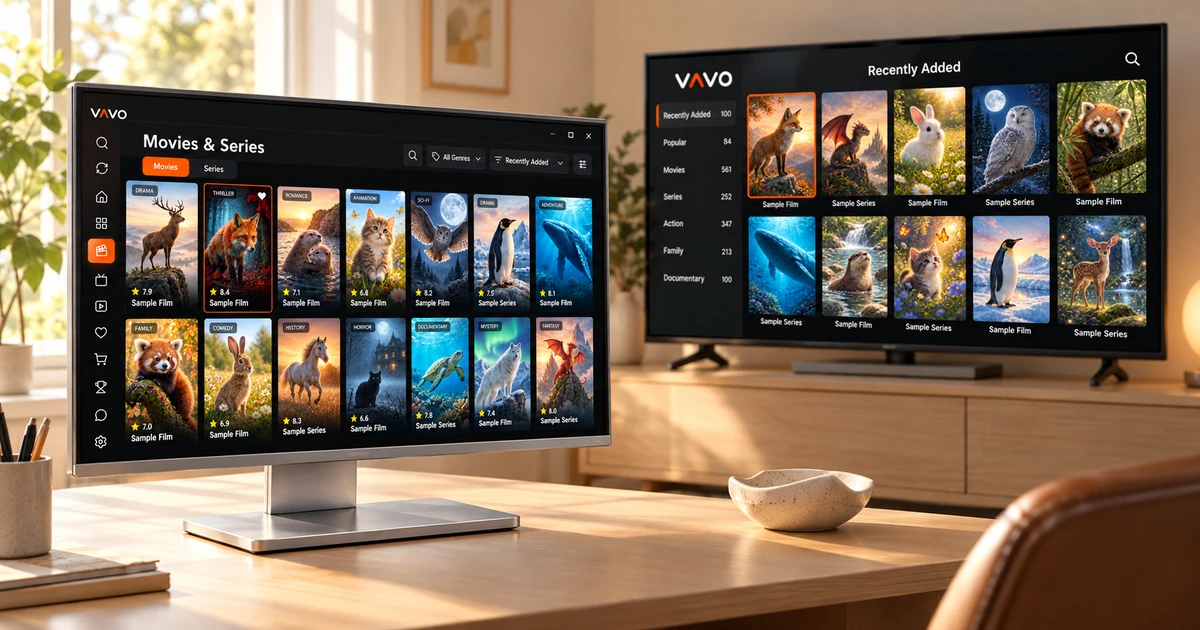

Looking for a GSE Smart alternative? Begin with the screen you want to use. A phone app may not be the right choice for your Windows computer or LG television. Vavo Player offers device-specific options, a visual film and series library, favourites and a way to pick up where you left off. Start with your own screen and discover an easier way to enjoy your media.
- Windows, LG and Samsung options
- Personal library for movies and series
- 60 days free trial
Choose a GSE Smart alternative that fits your screen
Bringing a phone application to the television does not always mean comfortable use with the remote control. On the computer, the needs also change: you want to make quick searches with the mouse, see the library in a wide area, and make room for other work while watching. The starting point for choosing Vavo Player is this actual usage habit. You can evaluate your library by choosing the version suitable for your screen.
GSE Smart's reviewed platform catalog includes iOS, Apple TV, Android and macOS. Vavo Player's individual device pages offer a more direct start when you're looking for options for Windows, LG webOS or Samsung Tizen. It is an important reason to examine the experience prepared for that platform without changing your television or computer.
Vavo Player's strength in this comparison is not just that it opens a list. You can organise your personal library on Windows, select content with the remote control on supported televisions, and proceed via touch operation on your Android device. See the features of each version on its own page. Make your purchasing decision based on the screen you will actually use.
Turn your desktop collection into a library you want to explore
When choosing a movie on your computer, you don't want to just look at the filename. Poster, synopsis, genre and episode layout make it easy to decide what to watch. Vavo Player's Windows experience establishes this selection through visual cards and clear categories. Examining recently added movies or returning to your unfinished series become shortcuts that meet different needs within the same library.
Search and sorting preferences within the category make your work easier in the crowded library. You can choose larger cards, adjust the appearance of content names, and hide items that don't have an image. The value of these options is not so much that they show everything on the screen, but that they move your own library into an order that you can easily read. Vavo Player uses the large space on the desktop to help you with your selection.
If you're on a Mac, proceed to the macOS media player page for your screen. Examine the features of the relevant version without attributing the detailed control options of Windows to all platforms in the same way. For the user looking for a different daily routine than GSE Smart, the real advantage of Vavo Player is that it combines device research with a personal library experience.
Browse your LG or Samsung library from the sofa
The difference felt in the first few minutes when choosing a player on TV is the convenience of navigation. Being able to read the texts from a distance, distinguish the selected card and easily return to favourites determines the daily experience. Vavo Player's TV approach presents the movie and series library in a format that you can use with a remote control. When you find the content you want to watch, you can start playing it on the same screen.
Our LG TV player and Samsung TV player pages are starting points that you can directly examine when choosing for your television. Favourites, searching, and picking up where you left off reduce the need to find your favourite content again. Start testing by checking model compatibility with your own TV; Don't assume that all the advanced settings on the desktop are available in the TV version.
Return to your choices each evening
One of the most useful features when following a series is quickly returning to the right episode. The Continue Watching section of Vavo Player creates a start for you to find the videos you left unfinished. You can see the remaining time in the Windows experience, remove content you no longer follow from this area, and select episodes via season tabs. Thus, your library is shaped according to your viewing habits.
Favourites also open a practical space for the content you want to watch in the future. Adding a movie to your favourites as soon as you notice it can save you from a long search the next evening. You create this layout within your device; Don't assume that your watch history on another device will sync automatically. It's this personal layout that makes Vavo Player so powerful in daily use that you'll want to open it again on your own screen.
Make playback suit your preferences
In your search for a GSE Smart alternative, look for playback convenience as well as library. By using Vavo Player's supported controls with your own videos, you can see which options correspond to your daily viewing habits. There are multiple conveniences that you can consider in Windows, especially for users who want detailed settings.
- Select the audio and subtitle tracks included in the video. Edit the size, colour and background appearance of the subtitle on Windows according to your reading preference.
- Change the playback speed and display settings on desktop according to your needs. Take control in a training video or personal recording.
- Free up space on your computer for other work by using the mini player. Minimizing your viewing session doesn't require a restart.
- Use the next episode countdown while watching a series. Cancel when you want to take a break. Let the auto-continuation decision be in your hands.
Practical reasons to choose Vavo Player
| Your need | Vavo Player option | What to check |
|---|---|---|
| Windows computer | Separate Windows option for visual library and desktop controls. | Windows is not listed in GSE Smart's reviewed catalogue. |
| LG or Samsung TV | Use with the page and remote control of the relevant television platform. | Check the compatibility of the application with your television model. |
| Personal library | Favourites, categories and picking up where you left off. | Evaluate during the trial how you will find content each day. |
| Choosing a licence | 60 days trial; $9 annually or $18 lifetime for a single device. | Make your choice knowing that the licence and your media source are separate. |
These points that make Vavo Player stand out are the advantages that you can see on your own screen. If you're specifically looking for a direct option on Windows or supported LG and Samsung televisions, start by examining Vavo Player's platform experience rather than switching devices.
Explore your own viewing habits during a 60-day trial
In Vavo Player licence options, 12-month usage for a single device is $9, and lifetime usage is one-time $18. The annual licence is renewed with a new purchase whenever you need it; There is no automatic renewal fee. One licence is tied to one device. If you are considering separate premium usage for your computer and television, consider the licence of each device separately.
Create a real viewing pattern with your own content in a 60-day free trial. Add a few favourites, search, leave a section halfway through and come back later. This way, your decision isn't based solely on promotional screens. Vavo Player is media player software; does not provide channel, movie, series or media subscriptions. You add the resources you have the right to use.
Questions about switching from GSE Smart
Will my GSE Smart settings be automatically carried over?
We do not promise automatic transportation. Add your own compatible media sources to Vavo Player and create your favourites and playback preferences in the new app.
Do I need to buy another TV for Vavo Player?
First check your current device on the platform page. You can consider the appropriate option for LG webOS, Samsung Tizen and other supported displays.
Is this article a recommendation for iPhone or Apple TV?
This comparison is based on Vavo Player's current Windows, Mac, Android and supported TV options. Check the published platform page for the device you will use.
Start with a better organised library on your screen
Choosing Vavo Player as an alternative to GSE Smart means combining the convenience of a personal library with the option suitable for your device. Start from our platform pages, especially when using Windows, LG and Samsung. Add your media and try favourites, resume area and playback controls free for 60 days. Make the licensing decision based on your own use.
This comparison was prepared by Vavo Player Team. GSE Smart platform information was reviewed on October 7, 2026 and may change over time. The name GSE Smart is used to identify the relevant product; brands are independent. Vavo Player features should be evaluated according to your device.
Find your Vavo Player experience.
Explore the features for your screen and try Vavo Player with your own media.